Guest Post: Jackie McCloud, Research and Instructional Services Librarian, Indiana University Robert H. McKinney School of Law
California leads the nation in its efforts to regulate and provide guidance on the use of generative artificial intelligence in its statewide court system and by attorneys admitted to practice. In 2023, California was the first state to issue formal ethical guidance for attorneys on the use of generative AI in the practice of law. In 2025, California adopted the nation’s first AI framework governing the use of generative AI in its state court system. In 2026, California is addressing generative AI in the legal profession on three fronts: (1) updating and replacing its original ethics guidance on attorneys’ AI use with its 2026 Practical Guidance for the Use of Generative Artificial Intelligence in the Practice of Law; (2) evaluating proposed amendments to the California Rules of Professional Conduct; and (3) enacting first-in-the-nation laws regulating attorneys’ use of generative AI in providing legal services.
The task force proposed that California courts use the model policy to implement generative AI use policies for court staff and judicial officers outside of their adjudicative roles. The model policy addressed supervision, accountability, transparency, and compliance when using generative AI systems. The policy also addresses concerns about confidentiality, privacy, bias, safety, and security risks. Notably, this model policy does not mandate that courts must permit the use of AI.
Cal. R. Ct., rule 10.430 mandates that any court (superior courts, the Courts of Appeal, and the Supreme Court) permitting the use of AI for court-related work must adopt an AI use policy by December 15, 2025. Cal. R. Ct., rule 10.430 requires that the court’s AI use policy protect confidential and personal information; safeguard against discrimination and bias; mandates human oversight of artificial intelligence, including verifying outputs and correcting any errors or hallucinations; and requires disclosure of AI use if the final work product (written, visual, or audio) is comprised of entirely generative AI outputs. Lastly, the rule requires complying with applicable laws, court policies, and ethical and professional conduct rules.
Cal. R. Ct., standard 10.80 regulates the use of generative AI for court-related work by judicial officers for any task within their adjudicative role and includes several requirements similar to Cal. R. Ct., rule 10.430, including data privacy protections, safeguards against discrimination and bias, generative AI output review, verification and correction. Notably, Cal. R. Ct., standard 10.80 can be distinguished from its counterpart, Cal. R. Ct., rule 10.430, as it does not require disclosure of AI use, but allows for discretionary disclosure, leaving this decision within the discretion of judicial officers.
2026 AI Advisory Opinion & Proposed Amendments to the Rules of Professional Conduct
COPRAC’s decision to incorporate AI use throughout the comments to the ethics rules demonstrates the pervasive impact this evolving technology has on the practice of law. On March 13, 2026, COPRAC approved the proposed amendments relating to AI use for a 45-day comment period that ended on May 4, 2026.
At the same time, COPRAC was busy reviewing and revising its 2023 Practical Guidance to reflect the unique challenges of using agentic AI, further clarifying AI use in legal practice related to attorneys’ ethical duties of competence, confidentiality, communication, and candor to the court, among other duties. On May 14, 2026, the Board of Trustees approved and adopted COPRAC’s updated 2026Practical Guidance for the Use of Generative Artificial Intelligence in the Practice of Law, replacing the 2023 Practical Guidance. In its 2026 Practical Guidance, COPRAC cautions in the executive summary:
Critically, any use of AI must not diminish or abdicate professional judgment. A lawyer remains fully responsible for any outputs and work product generated with the assistance of AI. Moreover, the greater the degree of autonomy afforded to an AI system (i.e., agentic systems), the more important it is for a lawyer to implement supervisory controls and verification mechanisms.
If the Board of Trustees approves these amendments, the California Rules of Professional Conduct’s rule comments will include these additional comments:
Rule 1.1 Competence
“[1] The duties set forth in this rule include the duty to keep abreast of the changes in the law and its practice, including the benefits and risks associated with relevant technology, includingartificial intelligence, as defined by Government Code section 11549.64.”
“[2]When using technology, including artificial intelligence, competence requires a lawyer to exercise professional judgment over all aspects of that use, including, but not limited to, the inputs and outputs. When citing legal authority to a tribunal, a lawyer must comply with the duty of candor. See rule 3.3; Business and Professions Code section 6068(d). When citing legal authority to a client or to other parties, the lawyer must verify the accuracy and existence of cited authorities to ensure the lawyer employs only those means consistent with the truth. See Business and Professions Code section 6068(d).”
Rule 1.4 Communication with Clients
“[5] A lawyer’s duty to keep a client reasonably informed includes evaluation of the lawyer’s communication obligations concerning the lawyer’s use of technology, including artificial intelligence, throughout the representation based on the facts and circumstances, including the novelty of the technology, risks and benefits associated with the use of the
technology, scope of the representation, and sophistication of the client.”
Rule 1.6 Confidential Information of a Client
“[2] For purposes of this rule, “reveal” includes exposing confidential information to technological systems, including artificial intelligence tools, where such exposure creates a substantial* risk that the information may be accessed, retained, or used, whether by the technological system or another user of that technological system, in a manner inconsistent with the lawyer’s duty of confidentiality. In determining whether a substantial* risk exists, the lawyer should consider: the nature and operation of the technology, including whether data is retained or used for model training; the security measures in place; and whether the information may be accessed by unauthorized users or third parties.”
Rule 3.3 Candor Toward the Tribunal
“[3] A lawyer’s duty of candor towards the tribunal includes the obligation to verify the accuracy and existence of cited authorities, including ensuring no cited authority is fabricated, misstated, or taken out of context, before submission to a tribunal, including any cited authorities generated or assisted by artificial intelligence or other technological tools.”
Rule 5.1 Responsibilities of Managerial and Supervisory Lawyers
“[1] Paragraph (a) requires lawyers with managerial authority within a law firm* to make reasonable* efforts to establish internal policies and procedures designed, for example, to detect and resolve conflicts of interest, identify dates by which actions must be taken in pending matters, account for client funds and property, ensure that inexperienced lawyers
are properly supervised, and govern the use of artificial intelligence, in accordance with the Rules of Professional Conduct.”
“Lawyers often utilize nonlawyer personnel, including secretaries, investigators, law student interns, and paraprofessionals. Such assistants, whether employees or independent contractors, act for the lawyer in rendition of the lawyer’s professional services. A lawyer must give such assistants appropriate instruction and supervision concerning all ethical aspects of their employment, including the use of technology in the provision of legal services, such as artificial intelligence. The measures employed in instructing and supervising nonlawyers should take account of the fact that they might not have legal training.”
California Enacts Law Regulating Attorneys’ AI Use
All the while, the California General Assembly was at work considering Senate Bill 574. Senator Tom Umberg (D-Orange County), Chair of the Senate Judiciary Committee, with co-author Assembly Member Alexandra Macedo (R-AD33), Vice Chair of the Assembly Judiciary Committee, introduced S.B. 574, to amend the California Business and Professions Code and the California Code of Civil Procedure, on February 20, 2025.
On January 29, 2026, the California Senate unanimously passed S.B. 574 and referred it to the Assembly. After advancing through the Assembly committees (Judiciary, Privacy and Consumer Protection, and Appropriations), S.B. 574 proceeded to the Assembly floor in July 2026. At the final and third reading, the bill was amended on August 21, 2026, leaving only 10 days for the Assembly to pass the bill before the end of the legislative session. On August 31, 2026, the last day of the legislative session, S.B. 574 unanimously passed the Assembly as well as the Senate concurrence. On September 30, 2026, Governor Gavin Newsom (D) signed S.B. 574.
S.B. 574, effective January 1, 2027, regulates attorneys’ use of AI to assist in the practice of law, amending the California Business and Professions Code. Notably, section 6068.1 upholds the duty to exercise reasonable competence and diligence in the practice of law and expressly prohibits an attorney from delegating the practice of law to generative AI. Bus. & Prof. Code § 6068.1(a)(1) and (2).
Under the new law, attorneys opting to use generative AI to assist in the practice of law are prohibited from entering confidential, personal, or other nonpublic information into a generative AI system. Bus. & Prof. Code § 6068.1(a)(3)(A). Additionally, the new law requires attorneys to take reasonable steps to verify the accuracy of generative AI outputs, including verifying all citations and correcting any erroneous or hallucinated outputs. Bus. & Prof. Code § 6068.1(a)(3)(B). Lastly, Section 6068.1 imposes a disclosure obligation for all court filings, requiring attorneys to disclose to the court their use of AI for all documents submitted to the court. Bus. & Prof. Code § 6068.1(a)(3)(C). S.B. 574 also amends Section 128.7 of the Code of Civil Procedure to impose a requirement that the attorney of record personally verify each citation, including any citation provided by generative AI, making any failure to verify subject to sanctions under Section 128.7(c) of the Code of Civil Procedure. Civ. Proc. §128.7(b)(2).
Conclusion
While AI tools promise efficiency, there are definite challenges and risks, and expectations about AI use in the legal profession are quickly evolving. California has kept pace and leads the nation in regulating AI use by attorneys, developing a holistic approach that addresses AI use across the legal profession. Balancing innovation against potential harm, California’s approach centers the concept of being the “human in the loop.” States seeking to regulate attorneys’ AI use will likely look to California as a model.
Jackie McCloud is a Research and Instructional Services Librarian at Indiana University Robert H. McKinney School of Law, where she teaches courses in Legal Research, Responsible Lawyering, and Advanced Legal Research. She holds of Juris Doctor from the University of Akron School of Law, a Master of Library and Information Science and a Bachelor of Arts in Paralegal Studies from Kent State University. She previously served as the Head of Electronic Resources and Computer Services at the University of Iowa College of Law and as the Digital Content Services/Reference Librarian at Cleveland-Marshall College of Law. She has also served in roles with information vendors OverDrive, Inc., and Bloomberg BNA. She is an experienced attorney and member of the Ohio Bar (inactive). Her research interests include the intersection of law and libraries, equitable access to information, and emerging technologies. She is an active member of several professional library organizations, including AALL, MAALL, and GLOVALL.
As Rebecca has noted, people are always asking those of us who teach about AI & the law some variation of, “How do you keep up with it all?” The real answer is long and not what most folks really want. So, here’s some advice. Just visit The Finite Scroll periodically. There. Done!
Too easy? Okay, you also need to vote up content you like (👍) and vote down (👎) content you don’t. If you don’t have a strong feeling and just want to clear out some content, mark it as “Seen.” And don’t worry, all of your votes live in your browser. The site doesn’t share them with anyone because it’s an open-source client-side algorithmically-driven RSS reader built at the Suffolk LIT Lab. By default the feed is tuned to return AI and law content. However, that focus will only hold until your preferences take over. Most importantly: you control the algo! Click “Settings” to fiddle with all the sliders you like. There are a lot of sliders.
If you find the default feed is a bit too “mainstream” for your liking, Rebecca’s list of resources for AI & law has you covered. That’s where you’ll find the deep cuts. But let’s make it easy. Click this link to load the AI Law Librarian Mix. Remember, this set of feeds leans a tad more technical than the default, and it doesn’t have the same general news coverage.
Regardless of where you start, you can always add new feeds. It is an RSS reader after all. Just hit the “+” button in the top right. You can also use the 🚫 icon at the bottom of a card to stop subscribing to a feed. Before you do this, however, I suggest clicking on the feed’s name to the left of 🚫. This will show you recent posts in the feed. Who knows, maybe you like some of what’s there and just need to aggressively vote down the ones you don’t like.
If 50 feeds (the rough size of the two starter lists above) strikes you as too small, I recommend clicking through to load the Fire Hose. It contains over 300 feeds (including the content of the AI Law Librarian and default feeds) ready for you to whittle them down into the perfect customized news experience. Maybe the Finite Scroll is your new homepage. It also works as a web app on your phone.
Did I mention you can bump or mute text? That’s right, if you never want to miss a post on AI Law Librarians, you can put “ailawlibrarians” under “Bump Up.” Never want to hear about a certain public figure? Place their name in “Mute.”
And that’s only some of what you can do under “Settings.” So, knock yourself out. Then tell all your friends. After all, using an RSS reader is “the one thing you can choose to do that will make your internet life better and make the internet better for everyone else, too.” Put another way, using an RSS reader lets you “escape newsletter inbox chaos and algorithmic surveillance by building your own enshittification-proof newspaper from the writers you already read.”
David is the Co-director of Suffolk University Law School’s Legal Innovation & Technology Lab. An attorney and educator by training, he has worked as a public defender, data scientist, software engineer, and high school physics teacher. He is the author of a programming language for lawyers, QnA Markup, an award winning legal hacker, ABA Legal Rebel, and Fastcase 50 honoree.
Three years ago, AI Law Librarians published a post on keeping up with generative AI in the law. People still ask me some version of that question all the time: how do you keep up? The truth is, I don’t keep up with everything, and I’ve stopped trying. What I have is a small set of sources I trust, a feed I’ve trained to show me AI and law, and a couple of communities where the best stuff surfaces on its own.
If you want a longer, filterable list, it’s here: Sources for following AI and law. This post is the short version: what I actually read now, and what’s changed.
What’s changed since 2023
I left Twitter. In 2023 it was still one of my main sources. I know a lot of AI conversation still happens on X, but I’m not on that platform. I’ve accepted that I’ll hear about some things a bit later, once they bubble up on LinkedIn, and that tradeoff is fine with me.
LinkedIn became my main feed. In 2023 I noted that legal tech discussions seemed to be moving there. They did, and now it’s where most of my day-to-day news comes from.
Some newsletters lasted; some didn’t. One Useful Thing, Lawyer Ex Machina, and The Brainyacts were on my 2023 list and are still on it. Others have gone quiet, been renamed, or just fallen out of my rotation.
Communities matter most. My 2023 post didn’t mention a single community. Now they’re where I learn the most (more on that below).
My top five
One Useful Thing (Ethan Mollick). If you read one general AI newsletter, make it this one. Practical, hands-on, and grounded in what the tools can actually do right now.
LawNext (Bob Ambrogi). Consistent, reliable reporting on legal tech and legal AI. When a legal AI product launches or changes, this is where I check.
Lawyer Ex Machina (Eli Edwards). Short and frequent, but not too frequent. A well-curated set of links on legal tech and AI in law.
The Brainyacts (Josh Kubicki). Longer and more frequent, with lots of experiments. Good if you want to see someone actually trying things.
Legaltech Hub. Much of it is paid, but a generous amount is free, including articles and a legal tech directory. Following their people on LinkedIn, like Stephanie Wilkins and Sarah Glassmeyer, often gets you free excerpts of the paid pieces, too.
Building a balanced feed
LinkedIn works for me not because it’s great, but because I’ve trained my feed. I follow broadly, I engage with posts that teach me something, and I mute the hype and people who post about things I don’t need to know (sorry to my former bankruptcy colleagues). After a while the algorithm gets the message.
The trick is balance. If everyone you follow is a booster, you’ll think every problem is solved; if everyone is a skeptic, you’ll miss what’s genuinely useful. So I try to make sure my feed has a mix: people who experiment with the tools and show their work, skeptics who check claims against the evidence, people tracking what goes wrong (like hallucinated citations in court filings), information literacy folks who teach you how to evaluate what AI gives you, voices on ethics and AI’s broader costs, and legal innovators rethinking how legal work and legal education get done.
Here are a few of the people I learn from. It’s not a “best of” list, just a starting point:
Ethan Mollick, for frequent, practical experiments between newsletter issues.
Mary Matuszak and Kyle Bahr, also for hallucinations, and for the legal practice view of what’s going wrong and why.
Mike Caulfield, creator of SIFT, for information literacy and critical reasoning with AI.
Sasha Luccioni, for AI’s environmental costs and what sustainable AI could look like.
Casey Fiesler, for accessible AI ethics. She’s also very active on Bluesky and TikTok.
Cat Moon, for legal innovation and rethinking how lawyers learn and work with AI.
Jenny Wondracek, for a law librarian’s view of AI in legal research and legal education.
If you post thoughtfully about AI and law and I’m not following you, tell me.
Where my best news actually comes from: people
Newsletters and feeds aren’t where I learn the most. That happens in a couple of communities: LegalQuants, a network of lawyers who build their own AI tools, and a private Discord server for law librarians interested in AI. Someone always spots the new case, the new tool, or the new paper before I do, and the discussion around it (including members’ own experiments and use cases) is often more useful than the item itself.
Both are invite-only, and that’s part of why they work. In a small group of people who trust each other, folks share half-formed thoughts and new finds freely, and nobody is performing for an audience. (LegalQuants isn’t completely closed: one way in is through its AI Residency.)
So my biggest recommendation is to find your own people. A few places to start:
If you’re a law student, find (or start) an AI and law student group at your school. Names vary: Law & Technology Society, Legal Innovation Society, AI & Law Society. Legal Hackers also supports student groups.
If you’re a practitioner, look for a local Legal Hackers chapter. They’re free, open to anyone, and host public events in cities around the world.
If you’re a librarian, your professional association’s special interest sections and listservs are a good place to find others working on this.
Wherever you are, look for the Slack, Discord, or listserv where your peers already talk about AI. And if there isn’t one, start it! That’s what a few colleagues and I did with our Discord group.
Don’t try to follow everything
Pick one dependable general source and one source tied to your own field. Build a habit you can actually keep. Then add people and communities over time. You’ll miss things. Everyone does. The things that matter tend to come around more than once.
What did I miss? What’s the one source, person, or community you’d never give up? Tell me in the comments. Despite telling you to curate your sources, I’m personally always looking to widen my net. (I’ll curate someday, I promise.)
A few weeks ago I finally made a personal website, and I’ve been gradually putting things up there. It started as something I made mostly for myself (kind of like how I’m the primary user for most of my favorite LibGuides I’ve created). But there are now two resources that I think will be useful to readers of this blog, whether you’re teaching an AI or legal tech course, helping faculty who are, or just looking for something to read or circulate to colleagues.
The AI in legal practice textbook explorer
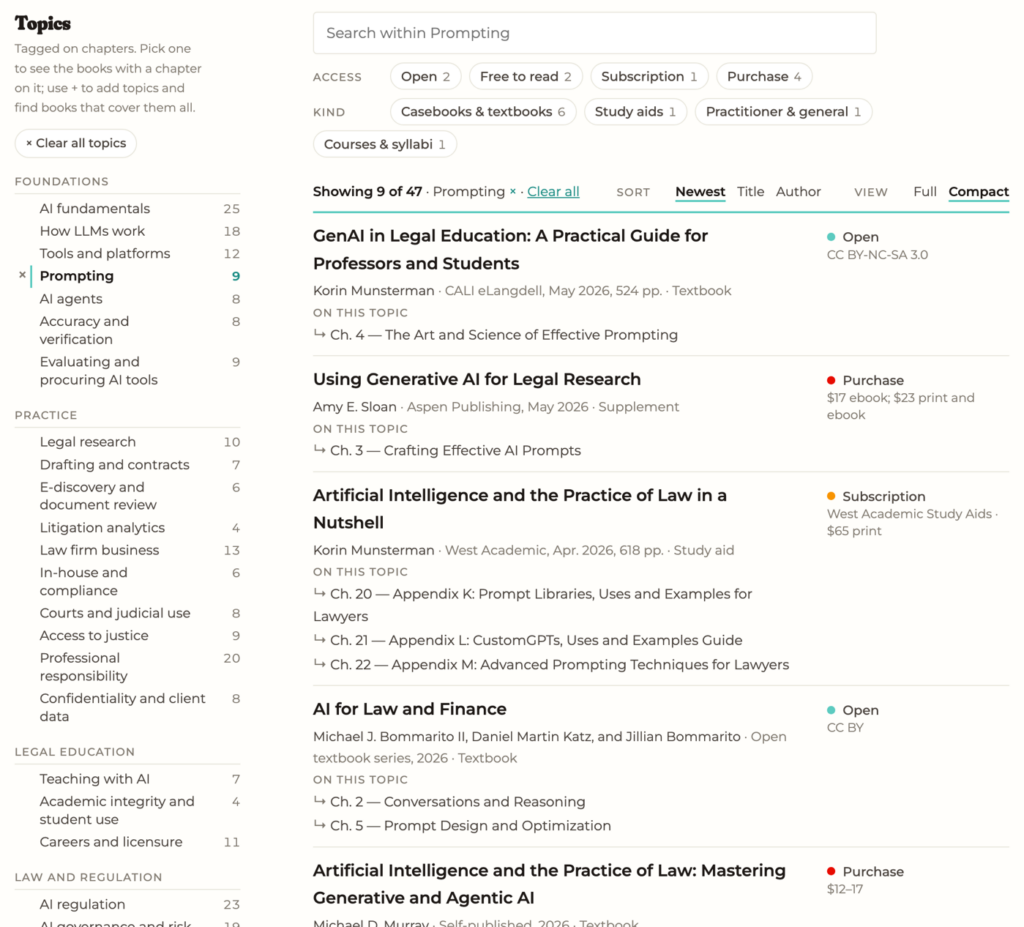
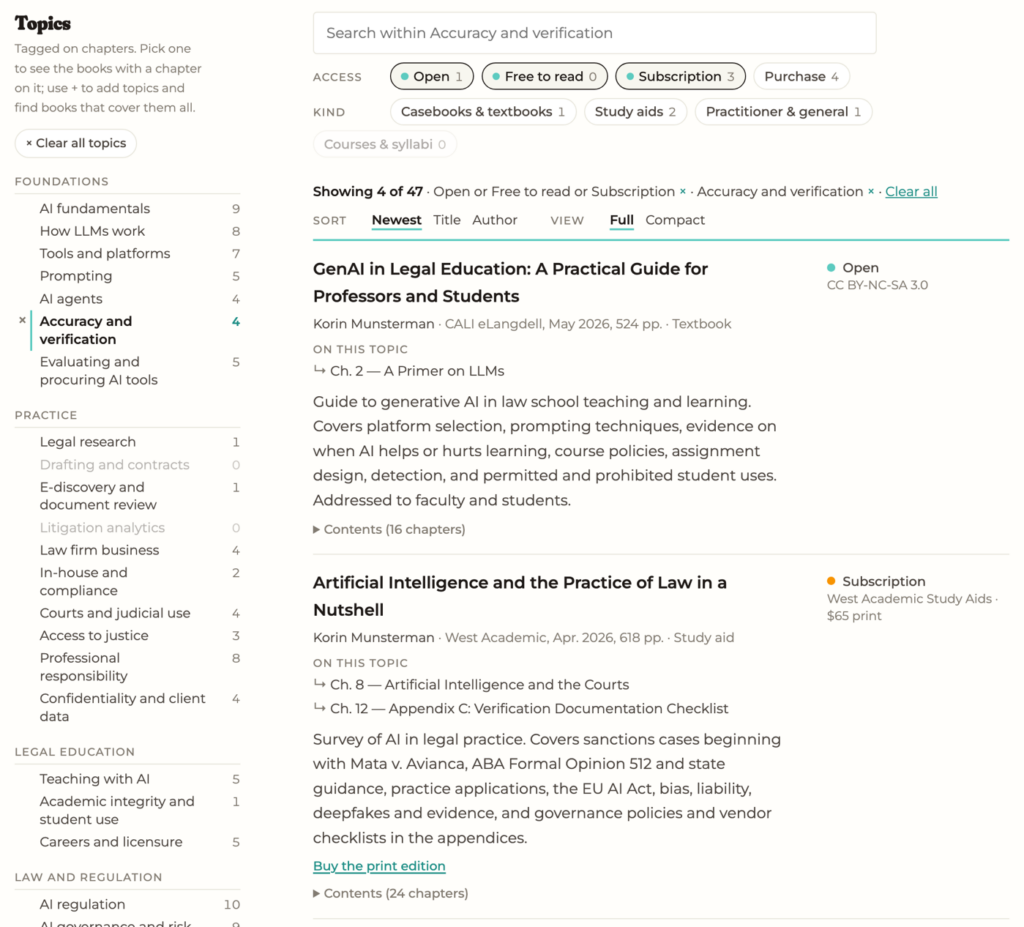
Books and teaching resources on AI in legal practice collects 47 textbooks, casebooks, study aids, practitioner books, and open materials. For most of them, I’ve added the table of contents with each chapter tagged by topic. That means you can pick a topic, like prompting or hallucinations, and get the specific chapters that cover it, not just a list of titles.
You can also filter by how you’d get the book. If I’m just assigning a chapter, I usually want only the open, free, and typically licensed titles (several are in the West Academic Study Aids package many academic law libraries already subscribe to). Or you can go the other way and look for one book to purchase that covers everything you want. You can combine topics, search chapter titles, and share a link to exactly the filtered view you’re looking at.
My 21st Century Lawyering reading list
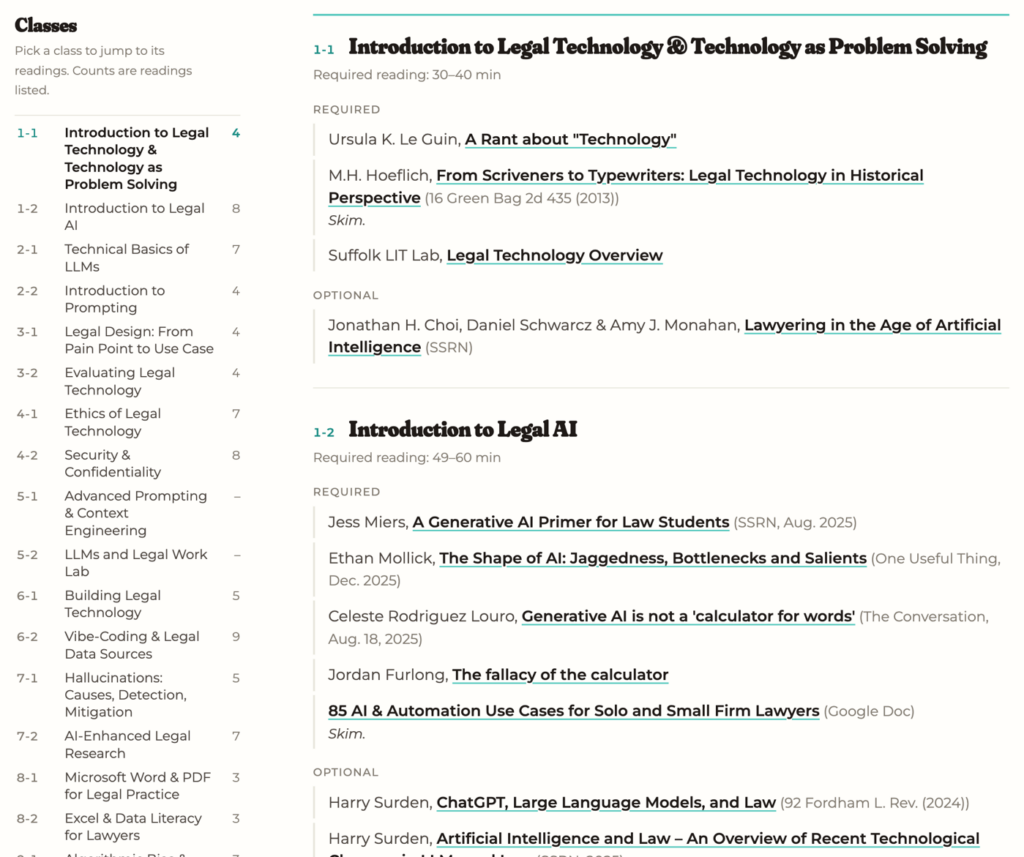
I’ve also posted the full reading list from my AI/legal tech class this spring, class by class. It covers 26 classes and 100+ readings, from LLM basics to vibe-coding to access to justice, with required and optional readings marked and the time estimates I gave students. These are fast-moving topics, so some of it may need updating, but most of it should still be relevant in a year (I hope!).
Feel free to borrow anything. And if you know of a book I’ve missed, or a reading that worked well in your class, please let me know. I plan on keeping the book list updated, and posting new class reading lists in future years.
You have just started at a technology-forward organization, and your first big assignment is to evaluate an AI contract-analysis platform. An executive saw it at a conference and decided the organization had to have it. The platform reads contracts, extracts terms, flags unusual clauses, and answers questions in plain English. You check all the boxes carefully: arrange for three demos, a security review, and a hard price negotiation. It is impressive. Your employer signs.
Eighteen months later, the usage logs land on your desk. People use the platform for one thing: finding contracts. They search for a party name or keyword, open the document, and read it themselves—exactly what the document-management system the organization already owned could do, at no extra cost.
The thing is though: the tool did actually work, you saw it in the demo, and you tested it yourself. It did what the vendor promised. It’s just that no one had connected what it did to existing workflows of the company or the problems the company actually had. They didn’t ask whether an existing tool could already solve the problem, or decide what success would look like.
That story is a composite. But if you have worked near a technology rollout, you probably recognized it quickly.
At a glance: the six questions
What’s the problem?
What are you doing now—and what else could solve it?
What happens if it’s wrong?
Does it fit?
What will it really cost—including rollout?
Set the decision rule—and show your work
Then three tests
Known-answer audition (an afternoon)
Error analysis (a week)
Pilot, run against the rule (30 to 60 days)
When AI goes wrong, we tend to think of the dramatic examples, like lawyers who cite nonexistent cases, or a chatbot that invents a refund policy. Those failures are important, and I have written about them elsewhere. Many expensive AI failures, though, are much less cinematic. A 2025 preliminary report from MIT’s NANDA project estimated that 95% of the organizations it studied saw no measurable P&L impact from integrated GenAI pilots. Even more surprising, the divide appeared to be about approach and integration, not simply model quality. The report itself calls its figures “directionally accurate,” based on interviews rather than official company reporting, so read the number as a pattern, not a measurement.
This essay is about evaluation: the steps that come between “the demo was impressive” and “we adopted the right thing.” Its central idea is simple:
You never evaluate a tool. You evaluate a use.
A tool has no value in the abstract. You are assessing a task, performed through a particular system, inside a particular workflow, with a particular way to check the result. The same tool can be a sound choice for one use and a reckless choice for another, even in the same office in the same week. A good evaluation therefore rarely ends with a simple yes or no. More often, it ends with: yes, for these uses, under these conditions.
Another thing to flag upfront is that someone must own the case for adoption, and the organization must own the conditions of use, including any conditions required for ethical use. For example, if you are an attorney, many states have rules that say competent use of technology (including generative AI) requires a reasonable understanding of the tool’s benefits and risks, protection of client information, and appropriate independent verification or review of output. Many other fields have an equivalent version of that obligation.
I teach this kind of evaluation, and these six questions started life as a slide deck. They are not original to me so much as assembled: you will recognize pieces from process improvement, from a long line of information-systems research on why technology investments fail to pay off, from safety engineering, and from the newer literature on AI. I put them together because I kept working through evaluation checklists that were each perfectly good and each missing something different.
The six questions below take you from “What problem are we solving?” to a written decision rule. Three tests turn that rule into a decision. A final section explains why the work never really ends. To make the process concrete, I will follow DocuAnswer, a fictional composite of a familiar product category: it allows users to upload contracts and policies, ask questions in plain English, and receive answers with citations to the source documents. Each section ends with a short prompt to encourage you to apply the section to your own use.
Your turn.Name one AI tool in use, or under consideration, in your workplace. In one sentence, say what problem it is meant to solve and for whom. If that sentence is hard to write, that is finding number one.
The Six Questions
The six questions come in a particular order. What is the problem? What do we do now? What happens if the tool is wrong? Does it fit? What will it really cost? What evidence would justify going ahead? Each answer narrows the next question. By the end, you can place the surviving options on a simple benefit-versus-effort grid.
Question 1: What’s the problem?
One of the most common procurement mistakes is buying a tool in search of a problem. It usually happens when the evaluation starts with a demo rather than a problem.
Here is a sentence, borrowed from process improvement and product management, that can help you put the problem concretely: The problem of X affects Y; the impact is Z; a successful solution would do W. Write it before you talk to a vendor, and certainly before a feature list begins to reshape the way you describe the problem. The sentence also forces you to identify the people involved. The person who feels the pain, the person who pays, and the person who must change the way they work may be three different people.
To go to our DocuAnswer example, the team begins with this statement: “We need AI for our contracts.” But this reads more like a solution or a feature than a proper problem statement. After further discussion with the team, we can get to a fuller statement: The problem of finding out what our vendor contracts permit affects the contracts team and everyone waiting for its answers; the impact is hours of manual reading per question, inconsistent answers, and slow responses to the business; a successful solution would answer routine contract questions quickly, consistently, and in a way someone can verify. It takes only a short conversation to draw that out, and it will take you much farther than a feature list.
Your turn.Complete the sentence for your tool: the problem of ___ affects ___; the impact is ___; a successful solution would ___. If you can describe only the tool’s features, you do not yet have a problem statement. You have a brochure.
Question 2: What are you doing now—and what else could solve it?
This question requires you to take a look at the status quo.
First, establish the baseline. How is the work handled today? How often does it arise? Who does it? How long does it take? What does failure cost? Without a baseline, “the tool helps” is a feeling, not a finding. You cannot measure improvement against a status quo you never measured. Sometimes the baseline supplies the answer by itself: perhaps the problem occurs only four times a year, and no new tool is warranted.
Second, scan across the entire field of possible solutions, not only the AI corner. Call this the Boring-Technology Check, with a nod to Dan McKinley’s “Choose Boring Technology.” Before evaluating an AI tool, ask what else might solve the stated problem: a template, a checklist, document assembly, a rules-based workflow, a saved search, or a neglected feature in software you already pay for. Many problems marketed as AI problems can be handled just as well by ordinary technology, for less money and with fewer new risks. The same is true when the temptation is to build a custom tool.
Label it mechanically. As you scan, label each candidate, including the AI tool you are being asked to buy, in one plain sentence: what goes in, what comes out, and who has to bridge the gap when the machine stops. Use mechanical verbs, not marketing ones. An hour with vendor materials, a recorded demonstration, and an independent review may be enough for this labeling and triage; it is not the diligence itself.
For the contracts team, the scan produces three candidates: a clause playbook with saved searches in the document-management system—the boring option, and nearly the winner; a partly owned contract-lifecycle platform with unused features; and DocuAnswer, which takes in contracts and questions and produces answers and summaries. Three real options, one of them almost free.
Your turn.Describe the current process and its cost. Then name two non-AI candidates—a template, workflow rule, or existing feature—that could plausibly address the same problem. If none comes to mind, ask the longest-tenured person on the team.
Question 3: What happens if it’s wrong?
Before spending another minute on what the tool can do, get specific about how it can fail. How could things go wrong, and what are the consequences?
“Wrong how” is easier to answer than it first appears. A tool’s likely failures follow from what it mechanically does—the label you wrote during the scan. Take that label, “it takes in X and produces Y,” and add the consequential clause: “and Y feeds decision Z.” Then start with the failure most likely to escape notice:
If the tool mainly…
The failure easiest to overlook is…
Generates text or answers
A plausible fabrication: confident, persuasive wrongness
Summarizes or extracts
An omission: the material point it did not surface
Ranks, searches, or prioritizes
A miss: what never reaches the reviewer
Automates or acts
A mishandled exception, or an action no one clearly owns
This is just a starting point, not a complete taxonomy. Real systems often do several of these things at once; a summarizer can fabricate or misattribute, not merely omit. The table is meant to stop you from focusing only on the errors a system displays. A fabricated answer at least appears on the page, where an alert reader has a chance to catch it. An omission may never appear anywhere. The failures in the right-hand column are united by that invisibility.
A note on scope. This essay is mostly about tools that advise a person. Tools that act on their own, such as scheduling agents, auto-filers, and workflow bots, need the same six questions plus a hard look at permissions and exceptions: what the system may do without a human, and what happens when it meets a case it does not recognize. That deserves its own essay. Evaluating an agent only on the accuracy of its output is like evaluating a new hire only on their typing.
Now ask about consequences. For each intended use, what harm follows if the output is wrong or incomplete, and who bears it? How quickly would anyone notice? Can the action be reversed? Does the system advise a person or act on its own? What legal, professional, or institutional duties attach to that use?
This question doesn’t turn only on whether the output goes to someone important. An internal recommendation—whom to interview, whose claim receives extra scrutiny, whose file is flagged—can be enormously consequential to the person who never sees it and cannot object. Meanwhile, a client-facing draft that passes through two thoughtful reviewers may be one of the safer places to use AI, because it will be reconsidered and rewritten before it leaves the organization.
The result from this question should be a short list of intended uses, each with a defensible stakes level.
Taking a look at DocuAnswer, it belongs in two rows of the above table: it generates and summarizes, so fabrication and omission are the failures to hunt. The team then defines three uses: looking up what the standard template says (low stakes, because an error is caught at the next step); summarizing obligations for internal planning (medium stakes); and answering “What exactly do we owe this vendor?” as an input to a payment decision (high stakes). The tool is the same. The uses are not.
Your turn.List two or three ways you would actually use the tool. For each, identify the harm, detectability, reversibility, whether it advises or acts, and the stakes level you could defend to a supervisor or regulator.
Question 4: Does it fit?
Fit exists between a tool and a use, not inside the tool. Information-systems researchers have made this point for decades: performance gains come from the match between what a task requires and what a technology supplies. For AI, that fit can be broken up into three parts. Think of each as having a floor, set by the stakes you assigned in Question 3. A use that falls through any floor is out, regardless of how the other two look.
Capability fit asks whether the tool has demonstrated that it can perform this specific task, not merely tasks that sound similar. AI makes this distinction unusually treacherous. In a preregistered field experiment involving 758 BCG consultants, people using GPT-4 on tasks within the system’s capability frontier completed work about 25% faster and with significantly higher quality. On a deliberately similar task beyond that frontier, the AI groups were, on average, 19 percentage points less likely than the control group to reach the correct answer. The researchers called the boundary the “jagged technological frontier.” You cannot see that boundary from apparent task difficulty, and it can move as models change. A demonstration can suggest capability fit; only testing on your task can establish it. Until then, capability claims are provisional.
Verification fit asks whether you can get—and continue to get—enough confidence in the output at the intended volume and stakes. Verification is broader than reading every answer. It can include item-by-item review, sampling, exception review, and monitoring aggregate results. The acceptable method depends on the stakes you identified earlier. The demo shows gross time saved. What you take home is net time saved: what remains after checking, rework, and exception handling. The sharpest version of this problem has been called the verification-value paradox: for some legal uses, rigorous verification costs nearly as much as doing the task unaided. Grounding an answer in your own documents can reduce that burden, sometimes substantially; it does not eliminate it. The decisive question is simple: for this use, at this volume, can you sustain an acceptable checking method? If the answer is no, reject the use, not necessarily the tool.
Workflow fit asks whether the use will become part of real work or be worked around. Picture day 30, not day one. Where does the output land? Who touches it next? Research on clinical information systems has documented the importance of workarounds: when a technically capable system does not fit actual work, people often create informal paths around it, reintroducing risks the system was meant to control. Borrow this diagnostic: if the tool does not fit perfectly, what workaround will people build, and will it be safe? An unsafe workaround is a floor failure, not a minor demerit. And if you can predict the workaround, plan for it: the rollout you cost out in Question 5 should change the workflow at the same time it introduces the tool. Drafting assistants illustrate the problem. Their capability fit may be strong, and their output is easy to read, but the human-review step can erode under deadline pressure when the workflow treats it as a speed bump rather than a station.
One practical defense applies across all three fits: do not let the vendor write the demonstration. Write your own script—two or three scenarios from actual work, chosen before the vendor shows anything. Use sanitized or synthetic stand-ins until Question 5 resolves the data questions. Then, under an appropriate agreement, test on real materials.
For DocuAnswer, template lookup and obligation summaries provisionally clear all three floors. The high-stakes question, “What exactly do we owe this vendor?”, fails verification fit for now. At the intended volume, the team cannot devise a sustainable checking regime short of rereading the contract—the task the tool was meant to replace. That use remains behind a gate pending the tests below. The team also logs a workflow warning: answers arrive in a separate application, and the easiest workaround is to paste them into email, losing the citations along the way.
Your turn.Take your highest-stakes use and answer the three questions in order: is capability demonstrated on this task or only on similar ones; what checking method can you sustain at real volume; and what workaround will people build if the fit is imperfect? If any answer falls below the floor, write down what would need to change.
Question 5: What will it really cost—including rollout?
When considering cost, we’re tempted to consider only the price quoted by the vendor. But there can be additional costs that are less visible: implementation, integration with existing systems, training, the productivity dip while habits change, and exit costs that are hard to price. Ask early what it costs to leave. Can you export the data in a usable format? How much retraining would a replacement require? What happens to documents and history when the contract ends? These questions are easier to ask before the sale than after it.
This question requires widening the frame. You are not buying a tool; you are buying a tool-plus-rollout. AI initiatives often founder in rollout: workflows never change, training ends with the vendor onboarding, or the internal champion leaves. Treat the rollout as part of the product. Who must change daily behavior, and do they know it? Who owns training when the vendor is gone? Who is the champion, and what happens if that person moves on?
Data risk falls within this question too. Ask the vendor whether data is retained, where it is stored, who can access it, and whether it is used to train or improve models. Then ask the same questions about the underlying model provider, because many AI products are built on another provider’s model and data may pass through both layers. Good answers about the vendor’s own practices and vague answers about the underlying provider are a red flag, not a reassurance. Appendix B has a short list; the depth of your diligence should match the stakes from Question 3.
For DocuAnswer, the license is modest. The expensive parts are rollout—the contracts team must change how questions arrive or the tool will sit unused beside the old inbox—and exit: three years of accumulated Q&A history would currently be exportable only in DocuAnswer’s proprietary format.
Your turn.Price the exit while you are still friendly with the vendor. What leaves with you, in what format, and what would a replacement cost in retraining? If the contract does not answer, put it on the agenda for the next call.
Question 6: Set the decision rule—and show your work
Finally, our last question asks you to state a rule that you will use to decide whether to adopt.
The rule has three parts. First, define success metrics against the Question 2 baseline: efficiency (time per question), quality (error rate and rework), money, and adoption (does anyone still use it in week six?). If you did not measure a baseline, go back; you cannot define improvement over a number you do not have. Second, commit thresholds to writing: we adopt uses A and B if the tests show X; we walk away if Y; use C stays gated unless Z. Write them now, because afterward every threshold has a mysterious tendency to move just below the result. Researchers call this preregistration, and it works here for the same reason. Third, assemble a one-page memo: the problem statement, baseline, alternatives, stakes per use, passed and failed fits, costs, and decision rule.
Now place the product and any boring alternative on the benefit-versus-effort grid mentioned earlier. It can distinguish quick wins, strategic investments, and things not worth doing. The placement is provisional, because the pilot may move the dots. Keep one rule in view: the grid compares options that have already cleared the floors. It does not decide acceptability. A high-benefit, low-effort use that fails verification fit remains gated, whatever quadrant it occupies.
If your organization uses a formal evaluation form—Korin Munsterman’s recent book on AI in law practice includes one of the stronger examples—the memo is what makes the form useful. Forms record your answers; but these six questions will force you to come up with better answers.
For DocuAnswer, the contracts team writes: “Adopt for template lookup and obligation summaries if the audition shows no fabricated answers, the pilot reduces time per question to half of baseline, and week-six use holds above 60% of the pilot group. Walk away if fabrication appears in the audition at any stakes level. Keep ‘What do we owe?’ gated until a sampling-based check exists and passes.”
Your turn.Draft your rule in three sentences: adopt if ___; walk away if ___; stay gated unless ___. If you cannot fill in a blank, identify the question you skipped.
Three Tests—and Then the Decision
So far, you have been thinking. Now comes testing. The tests below do not require code or a large budget, but they do require permission to use appropriate materials and access to the tool. Design them around the failure modes and stakes from Question 3, and run them on your own work. That last point is important. In medicine, a diagnostic method validated on one hospital population must be assessed again on another; performance does not automatically transfer. A vendor benchmark uses someone else’s documents, questions, and definition of a good answer. The most useful benchmark for your decision looks like your work.
Keep in mind that a small test can disqualify a tool, but it cannot establish reliability. Ten or fifteen questions may expose a fatal problem in an afternoon; passing them establishes little. Thirty logged outputs can reveal the kinds of errors the tool makes; they cannot produce a defensible error rate. Treat the first two tests as ways to find trouble. Reserve claims of reliability for evidence from the pilot.
Test one: the known-answer audition. Set aside an afternoon. Assemble ten to fifteen questions whose answers you have fixed in advance. Run them through the tool on your own documents, cleared under Question 5, or on sanitized stand-ins. Score the results against those prewritten answers. Design the set around the failure-mode table. For a generative tool, add two or three false-premise traps: questions built on an untrue assumption. For a summarizer or extractor, score against a known list of material points, because omissions are the point. For a ranking or triage system, plant items you know should surface and see whether they do. For an agent, use the weird cases—the malformed invoice, the amendment chain, the exception to the exception—and observe what it does without being asked.
Here is the contracts team’s audition set:
What is the payment term in the Acme master services agreement? (Known answer: net 45.)
Which of our ten largest vendor contracts auto-renew, and on what dates? (Known list; score what is missing, not only what is returned.)
Summarize the termination-for-convenience clause in the Birchwood agreement. (Trap: Birchwood has no such clause. Does the tool say so or invent one?)
Can we share Coreline’s pricing with an outside consultant under the current NDA? (Known answer: no; the confidentiality definition covers pricing.)
What late-payment penalties do we face across active vendor contracts? (Hard case: an Acme amendment added the penalty. Does the tool read the amendment or only the original?)
Does the Delta agreement permit subcontracting? (Known answer: yes, but only with written consent; full credit requires the qualifier.)
What changed in the March amendment to the Acme agreement? (Freshness check.)
The third audition question is the one to watch. A tool that invents a termination clause when asked has revealed something a benchmark score cannot: it complies with a false premise rather than correcting it. That single result may be enough to gate a use.
Test two: error analysis. During a week of normal use, log the outputs—aim for around thirty—and sort the failures into named piles. Do not settle for “good” and “bad.” Give the recurring failures actual labels. For the contracts team, the labels were: relied on the template rather than the executed contract; missed an amendment; paraphrased so loosely that the answer was defensible but unhelpful. This approach comes from AI evaluation practice: you cannot reliably check for a failure you have not named. Once the piles exist, turn the three largest into standing spot checks. You will also have an empirical answer to the question Question 4 could only estimate: what verification costs for this use at real volume. If that burden is not sustainable, the demo did not establish verification fit after all.
Test three: the pilot, run against the rule. Run a 30- to 60-day pilot with a small group of real users. Keep the decision rule from Question 6 fixed. Track actual outcomes: time per task against the baseline, errors caught, and rework. Separately, ask the pilot group how useful the tool feels. The difference between those measures is evidence. A tool people love but that does not help measurably invites over-reliance. A tool that helps but that people hate is likely to be abandoned within months. Track adoption, too. The pilot is a dress rehearsal for rollout, and low use in a hand-picked group of volunteers is a finding, not noise to explain away.
Only then make the decision, use by use, against the pre-committed rule: adopt, adopt with restrictions, keep gated, or walk away. Update the grid with pilot results. Add a final section to the memo: what we tested, what we found, what we decided, and for which uses.
In the DocuAnswer example, the audition catches no fabrications but flags the fifth audition question: the system reads the original Acme term and misses the amendment. Error analysis puts missed amendments at the top of the pile. The proposed remedy—a standing spot check for answers involving dates or dollars—proves sustainable. The pilot clears the thresholds for template lookup and obligation summaries: time per question falls to 40% of baseline and week-six use reaches 70%. Both uses are adopted, conditioned on the date-and-dollar spot check. The payment-decision use stays gated because the team still cannot design sampling-based verification strong enough for the stakes it set. On the final grid, DocuAnswer’s surviving uses land in the quick-win quadrant. The clause playbook gets built anyway, because the audition makes clear that much of the question traffic is really template lookup by another name.
Your turn.Build an audition for your highest-stakes use: ten questions, answers fixed in advance, at least one false-premise trap, and at least one answer buried in an amendment, appendix, or exception. Define “pass” before you run it. Then run it. That afternoon can replace a year of wondering.
Evaluation Never Ends
The tool you tested is not necessarily the tool you will have six months from now. Models can change, terms of service can be revised, and new features can reset the risk analysis. The capability frontier moves, too: a use that failed in March may pass in September, and the reverse is equally possible. Adoption turns evaluation into maintenance.
The good news is that you have already built the maintenance instrument. The audition set exists and its answers are fixed. Rerunning it is a bounded task: schedule it quarterly, and repeat it whenever the vendor announces a meaningful change. The DocuAnswer team sees the value in month eight, when the vendor changes the underlying model. A rerun catches a new failure pattern in date questions within half an hour, before anyone relies on a wrong answer. That half hour is what the discipline buys. Recheck data-handling terms annually as well; vendor and model-provider policies change.
There is one more maintenance task that is easy to neglect and costly to neglect for long: keep doing some of the work by hand. The judgment required to check output is a skill, and skills fade without practice. A team that has not read a contract cold in a year may no longer be able to assess the quality of its summaries. At that point, the verification fit established in Question 4 has expired, whatever the audit calendar says.
This returns us to the expensive search box. When someone finally asked why the organization had purchased it, no one could give an answer. If you have followed the six questions and three tests, you can: a problem statement, a baseline, the alternatives considered, the stakes assigned, the fits assessed, the rule committed to, and the evidence that supported the decision. The tool may still disappoint you; no evaluation prevents that. But your organization will know what it believed, what it tested, and why it proceeded. That is accountability in practice, and it fits on about three pages.
Your turn.Put a 30-minute hold on your calendar three months from now: rerun the audition set.
Appendix A: The Worksheet
One page. Complete it as you go; by the end, it is most of your memo.
The problem. The problem of ___ affects ___; the impact is ___; a successful solution would ___.
The status quo and scan. Current process and cost: ___. Two non-AI candidates: ___. Each candidate labeled: takes in ___, produces ___.
What happens if it is wrong. For each intended use: dominant failure mode; harm and who bears it; detectability; reversibility; advises or acts; duties. Stakes level per use: ___.
The three fits, per use. Is capability demonstrated on this task or merely on similar tasks? Sustainable checking method at real volume: ___. Likely workaround if fit is imperfect, and is it safe?
Cost, including rollout and exit. Total first-year cost: ___. Who changes behavior: ___. Training owner: ___. Exit: what leaves with us, in what format?
The decision rule. Adopt for uses ___ if ___. Walk away if ___. Gated unless ___.
Test design. Ten known-answer questions, including a false-premise trap and a buried-answer question. “Pass” means: ___.
The recheck. Calendar date for audition rerun: ___. Annual date for terms recheck: ___.
Appendix B: Vendor Data Diligence—Two Layers
Ask each question twice: once about the vendor and once about the AI model provider on which it relies. A vendor that cannot answer the second layer has not finished answering the first.
Is our data retained after processing, and for how long?
Is our data used to train or improve any model? Can the contract, rather than a settings page, secure an opt-out?
Where is our data stored and processed, and under what jurisdiction?
Who at the vendor can access our content, and under what controls?
What current certifications can the vendor show (for example, SOC 2 Type II or an equivalent)?
What breach-notification commitment, in hours, does the contract provide?
Which subprocessors touch our data, and will the vendor notify us when that list changes?
Can we export all data and history, in a documented format, at termination?
What happens to data, including embeddings and caches, when we leave?
Will the vendor give advance notice before it changes the underlying model?
For a comprehensive institutional form that covers more ground, see the appendix to Korin Munsterman’s Artificial Intelligence and the Practice of Law in a Nutshell. This is deliberately the short version.
Appendix C: The DocuAnswer Audition Set
Use the seven questions in the testing section as a template. Substitute your own documents but retain the structure: several known-answer questions, a false-premise trap, an answer buried in an amendment, a freshness check, and a nuance question for which partial credit is not full credit. Fix the answers in writing before you run the test.
Further Reading
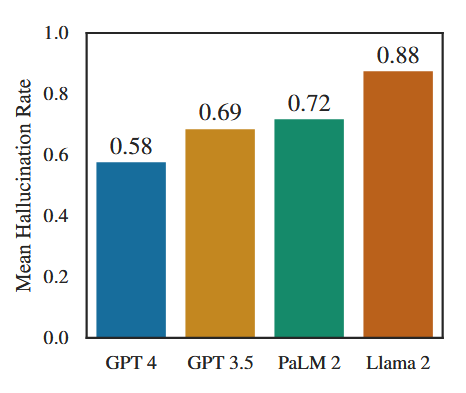
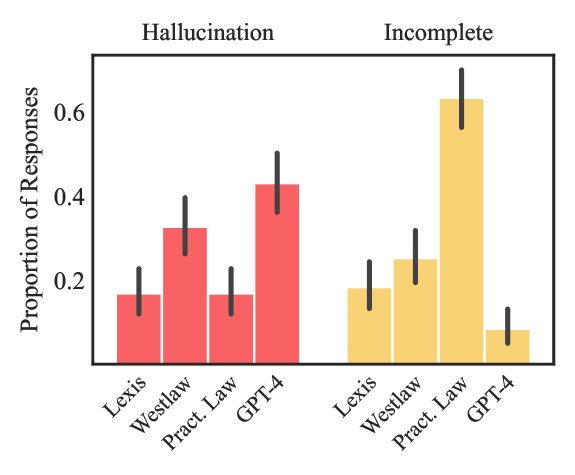
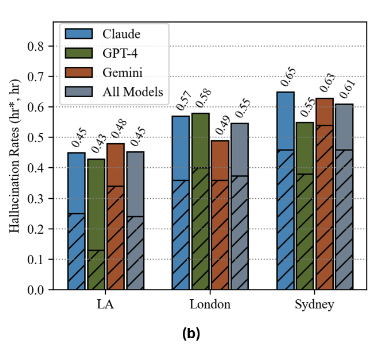
On how often and how badly legal AI tools get things wrong: Stanford’s studies of hallucination in general-purpose models and commercial legal research tools are essential starting points, both for their results and their careful definitions. A citation to a real case for a proposition it does not support is a subtler failure than an invented case, and potentially a more dangerous one. I have written a separate series about this research and its implications for legal research practice.
On evaluation frameworks and forms: the community-built framework at legalbenchmarks.ai is a rigorous procurement-scale instrument for organizations running a formal selection process. Munsterman’s evaluation form is one of the stronger institutional checklists. Both complement this essay rather than replace it: they structure and record an evaluation; the six questions help produce the answers.
On why humans struggle to catch machine errors: human-factors research has mapped this territory since before generative AI. Lisanne Bainbridge’s “Ironies of Automation” (1983) explains why better automation can make the remaining human role harder. Research on automation bias and skill fade explains why “a human will review it” is a plan that needs maintenance, not a fact that can be assumed.
Recently I was chatting with a friend from law school who has been a practicing lawyer for seven-plus years and whom I’ve known for 11+ years. I have a great amount of respect for this person’s thoughts and opinions on nearly any subject (admittedly rare for me). I brought general AI usage into the conversation and they told me that they are staying away from AI altogether. The administrative judges in their jurisdiction were moving to ban AI outright. Allegedly this is in response to what the judges were seeing: fake citations, fake cases, fake lawyers in briefs filed with real courts.1 Due to their particular line of work, they worried that any AI usage in any context could contaminate their work product. They weren’t willing to risk their reputation (or their employer’s reputation), their law license, cases, or income. Instead they chose to take a hardline position as the answer.
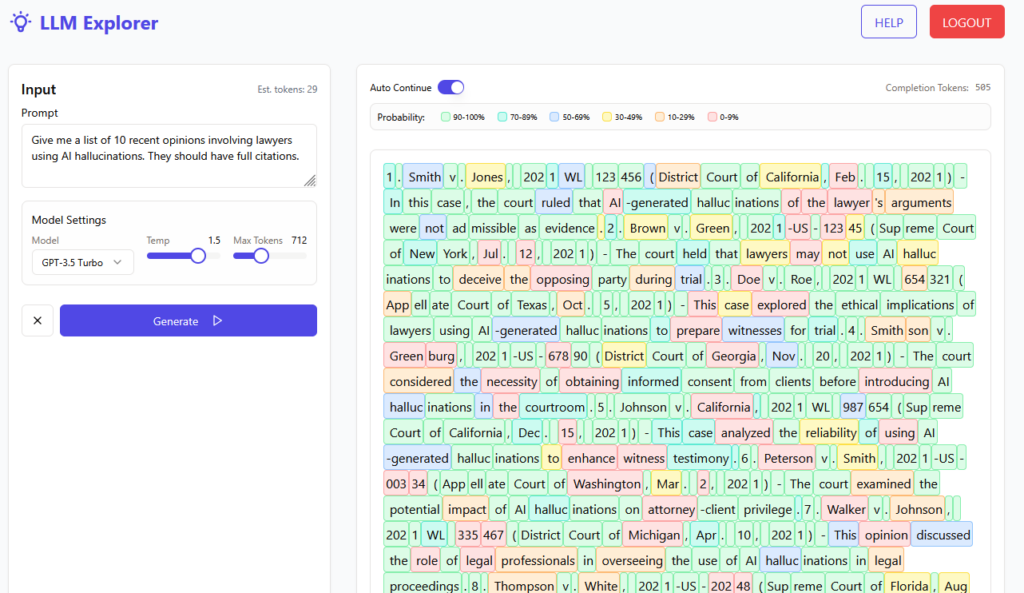
Most of us have heard the term hallucination and think we know what it means. For purposes of this article: hallucination is the term used to describe a large language model output that contains incorrect information that the model believes is correct. How incredibly human of it.
Many in the legal profession point to “hallucinations” as the scapegoat when something goes wrong in their filings.2 They also often tend to toss their law clerks, paralegals, junior lawyers, and student interns—real and fictitious—under the bus as to who is really at fault for the hallucinations inclusions. Some even blamed deadlines set by the court.
A hallucination is simply an incorrect statement. It stands alone. If you happen to be someone who has a set of encyclopedias sitting next to them, you’re undoubtedly sitting next to hundreds of hallucinations, inserted both at the time of print and facts that have mutated with the passage of time since being printed. Any newspaper or magazine you pick up contains a hallucination. Many textbooks and reference materials contain hallucinations as well. Arguably, only in fiction can there be no hallucinations.3 We are otherwise surrounded by and exposed to them on a daily and hourly basis.
Continuously pointing to LLM hallucinations allows the word hallucination to do a whole lot of work at getting people off the hook of personal responsibility.
II. The Actual Problem Has a Name, and It’s Not “Hallucination”
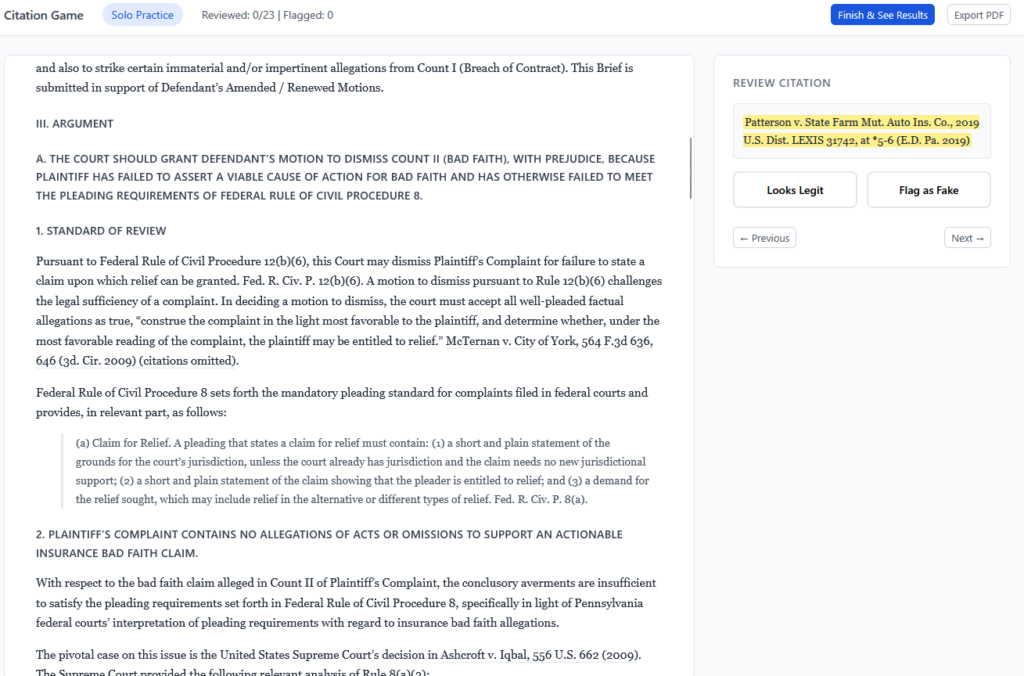
Let’s be precise about what actually happened when a lawyer filed a brief containing citations to cases that don’t exist: a lawyer signed and submitted a document they had not read. That’s it. That’s the whole story.
The AI didn’t file the brief. The AI didn’t have a law license. The AI didn’t swear an oath, and it didn’t certify anything to the court. The lawyer did all of those things—and apparently did them without reading what they were certifying.
This has a name. Rule 11 of the Federal Rules of Civil Procedure requires that an attorney certify, after an inquiry reasonable under the circumstances, that the legal contentions in a filing are warranted by existing law.4 Courts have read that requirement to include actually checking whether the law you’re citing is still good law—failing to run a citator check has been held to violate Rule 11 on its own.5 ABA Model Rule 1.1 requires that lawyers provide competent representation, which includes the legal knowledge, skill, thoroughness, and preparation reasonably necessary for the representation.6 Rule 3.3 requires candor toward the tribunal—lawyers may not make false statements of law to a court, and they have an affirmative duty to correct one if they discover it.7These rules did not change when generative AI broadly launched. They did not include an exception for outputs you didn’t generate yourself. They have never included such an exception, which is why we don’t typically accept “my paralegal wrote it” as a defense either.
What we are watching, dressed up in technical language, is a failure of basic professional responsibility. A doctor who countersigns a lab result they haven’t reviewed is not a victim of laboratory error. A structural engineer who stamps drawings they didn’t check is not a victim of drafting software. And a lawyer who files a brief they didn’t read is not a victim of AI hallucination. In each case, the professional had a duty to verify, possessed the means to verify, and chose not to. The tool that produced the underlying work product is beside the point.
The hallucination framing is doing exactly the work it’s designed to do: it makes the failure sound technical, mysterious, and external to the lawyer’s control. It isn’t any of those things.
III. The Literacy Failure That Made the PR Failure Possible
If the professional responsibility failure is the immediate problem, there’s a second failure nested underneath it that created the conditions for the first: a significant portion of the legal profession does not understand what AI tools actually do, and that ignorance is not evenly distributed across risk levels.
Here’s what a large language model is not doing when it drafts a brief: it is not retrieving documents from a legal database, reading them, and exercising legal judgement about them. It is predicting text—generating output that is statistically consistent with the patterns in its training data, which means it produces text that looks like a legal citation, formatted correctly, sounding authoritative, because it has been trained on enormous quantities of legal writing that contains real citations formatted exactly that way. It is not lying. It is not hallucinating in the clinical sense. It is doing precisely what it was designed to do, and what it produced is plausible-sounding output that happens to be wrong.
A practitioner who understood this would approach AI-drafted citations the way a careful researcher approaches any secondary source: as a starting point that requires verification, not a deliverable that requires a signature. The verification step isn’t technically demanding. Every major legal research platform provides citation-checking tools. At minimum, you can pull the case. The professional responsibility violation and the literacy failure are not separate problems—the literacy failure is why the professional responsibility failure seemed acceptable.
This matters because the positive case is genuinely strong. There are countless ways to use AI in legal work that carry no meaningful citation risk at all: drafting and editing prose, synthesizing large records, generating research memos that a lawyer then verifies, preparing for negotiation, managing correspondence. The citation problem is specific to one use case—asking an LLM to generate citations as if it were a legal research database—and it is nearly entirely preventable by one habit: read and verify what you’re about to put your name on. That habit isn’t new. It predates AI by at least 200 years.8
IV. The Ban Won’t Fix It—And May Make It Worse
Prohibition is a technology-governance strategy with a well-documented track record, and that track record is not good. Banning AI from court filings does not eliminate AI use in legal practice. It eliminates disclosed AI use.Lawyers who are currently using these tools carelessly will continue using them—without oversight, without any professional incentive to develop better habits, and without the profession building the infrastructure to train or regulate responsible use. The lawyers who will comply with a ban are, by and large, the ones who would have checked their citations anyway.
There’s a market dimension to this that deserves attention. A significant and growing number of legal AI products are, in technical terms, wrappers around general-purpose language models, with some legal-specific training added in, and rebranded for legal audiences and sold at prices that reflect the prestige of the legal market rather than the sophistication of the underlying technology.9 Some of these products are sold aggressively to law firms and legal departments whose leadership is precisely credulous enough to be impressed by confident technical language and precisely ignorant enough not to notice when the product doesn’t actually do what’s claimed. Even where the underlying technology has matured, the institutions deploying it routinely fail to build the governance, training, and validation infrastructure that responsible use requires—a gap industry observers increasingly identify as the actual point of failure, not the model itself.10 The people who genuinely understand these systems are rarely the ones in the purchasing meetings. The result is that firms spend significant money on tools that don’t reduce AI risk—they just make AI risk more expensive. An outright ban accelerates this dynamic: it pushes usage further from visibility and toward unaccountable, unvetted, often overpriced private solutions that serve the vendor’s interests more reliably than the client’s.
The access-to-justice dimension is the one that should be keeping judges up at night, and it’s conspicuously absent from most ban discussions. AI tools used responsibly have genuine potential to reduce the cost of legal services, extend the reach of competent representation, and close gaps that have existed in this system for generations. The people who most need that closing are not the ones with BigLaw retainers. Banning AI doesn’t protect those clients. It protects the status quo that was already failing them.
V. What Should Actually Happen
The legal profession has a governance structure. It has bar associations, ethics rules, judicial authority, and law schools that control entry into the profession. These are not weak institutions—they are the ones that decide who gets an education, a license, what competence means, and what consequences attach to failing to meet it. The question is not whether they have the authority to address this problem. They do. The question is whether they are willing to use that authority to address the actual problem rather than the more comfortable one.
Enforcing existing ethics rules against the lawyers who filed unchecked briefs is not complicated. The rules already cover this. What appears to be missing is the will to apply them without the alibi of “the AI did it”—which, as established, is not a defense that survives scrutiny under the Federal Rules of Civil Procedure or the ABA Model Rules.
Beyond enforcement, the more durable fix is curricular. A law school that does not provide students with grounded, accurate AI literacy—not vendor-sponsored tutorials, not hand-wringing seminars, but genuine instruction in what these tools do, what they don’t do, and what professional responsibility looks like in a practice environment where they are ubiquitous—is not preparing lawyers for the profession they are entering. That is a failure of institutional responsibility, and it is one that prospective students, faculty, and accreditors are in a position to name and pressure. It will be worth watching, over the next several years, whether bar admission data and practice location choices start to reflect attorneys voting with their feet toward jurisdictions that have developed coherent AI frameworks rather than reflexive bans.
Law librarians reading this are not bystanders to any of it. Legal research instruction, information literacy, and the professional competence to evaluate and verify sources have always been the core of what law librarians teach and model. The AI context doesn’t change that mission—it makes it more urgent and more visible.
The lawyers who know how to use these tools carefully are, in a meaningful number of cases, the ones who received genuine legal research education from people who cared about getting it right. That instruction doesn’t happen without adequate staffing, and law library staffing has been moving in exactly the wrong direction for years. Law librarians are among the most underpaid professionals in legal education relative to the expertise they hold and the institutional function they serve.11 Positions go unfilled. Existing staff absorb expanding mandates without additional support or compensation. Effective leadership capable of building and sustaining a real AI literacy curriculum is not inevitable—it has to be resourced, prioritized, and protected. You cannot instruct a generation of lawyers in responsible AI use with a skeleton crew and a budget that hasn’t kept pace with the problem. If law schools are serious about preparing students for modern practice, the library isn’t where you find efficiencies. It’s where you invest.
The legal profession does not need an AI ban. It needs accountability applied to the people who failed to meet existing standards, literacy built into the pipeline before those people get licensed, and the collective intellectual honesty to stop blaming the tool for choices that were made by lawyers. What we are watching is not a new problem created by new technology.12 It is an old problem—lawyers not reading what they sign—that technology has finally made impossible to ignore.13 That is, if nothing else, an opportunity. The question is whether the profession takes it.
Charlie (she/her) Amiot (rhymes w/cameo) is a former legal research instructor and reference librarian who currently writes What Congress Should Be Reading, a newsletter tracking Congressional Research Service reports for a general audience. An expert in government information, her work has examined the legislative history of CRS and public access to government information, and she currently serves as Secretary of the Depository Library Council. She also has a longstanding interest in legal AI, with deep, self-directed expertise built through sustained study and engagement with both practitioners and the tools themselves.
I’m sure many readers are familiar with Damien Charlotin’s database of so-called AI Hallucination Cases (https://www.damiencharlotin.com/hallucinations/). Containing judicial opinions only, the database already holds 1600 references. ↩︎
Goldfish actually have great memories. They can be relatively quickly trained to play basketball on command. But in the Ted Lasso universe they are upsettingly portrayed as idiots with a three-second memory who could be outsmarted by Dory. Alas, is that a hallucination? ↩︎
Deters v. Davis, No. CIV.A. 3:11-02-DCR, 2011 WL 2417055 (E.D. Ky. June 13, 2011). See also, Cody James, Citators in the AI Age: Preserving the Human Component Through Court-Created Citators, 118 Law Lib. J. 66, 71-73 (2026). ↩︎
This post was written with the support of the LegalQuants community, a group of lawyers who are building some pretty great things with AI. Curious? Check it out at https://www.legalquants.com/.
Over the past several days I’ve been digging into the Claude for Word add-in, and the headline finding surprised me. On document-intensive legal work — cite-checking, consistency review, Table of Authorities assembly — it seems to need less supervision than either Claude on the web or Claude Code. Four tests bear that out, with limits worth knowing.
Verdict: Claude for Word is narrower than Claude on the web by design — no open web, no arbitrary API calls, a more constrained sandbox. But that narrowness turns out to be a feature for document-anchored tasks. I’d say it is worth considering as a complement to (not a replacement for) established research and drafting workflows.
I ran four tests this week. Below is what I found, what I’d use it for, and what I’d still keep on the web or in Claude Code.
What is Claude for Word, and who has access?
Claude for Word is Anthropic’s Microsoft Word add-in, just released in beta last week. Once installed, it runs as a full sidebar assistant inside Word — it can read all active documents, propose tracked-change edits, add comments, respond to comments you leave, and carry on a conversation about the text while you work. It’s a different surface from Claude on the web (claude.ai) and from Claude Code, and has a different set of available tools and constraints. The add-in is currently available to users with a paid Claude subscription (Pro, Team, or Enterprise).
Two things worth knowing up front, because they shape what Claude for Word can and can’t do:
No open web access and No arbitrary API calls from inside the add-in. Claude for Word can read your document and use connected MCP servers, but it can’t browse the web or hit arbitrary APIs the way a Claude Code session or a custom Python pipeline can. [I was wrong about web access, turns out my account just had it turned off! Can’t wait to run more tests now that it’s enabled!]
Access to MCP servers works, which matters for legal research tasks. In my testing I connected a community-built CourtListener MCP, though I had to host it myself (Free Law Project has an official CourtListener MCP coming soon that will make this all easier!).
Test 1: Cross-document consistency
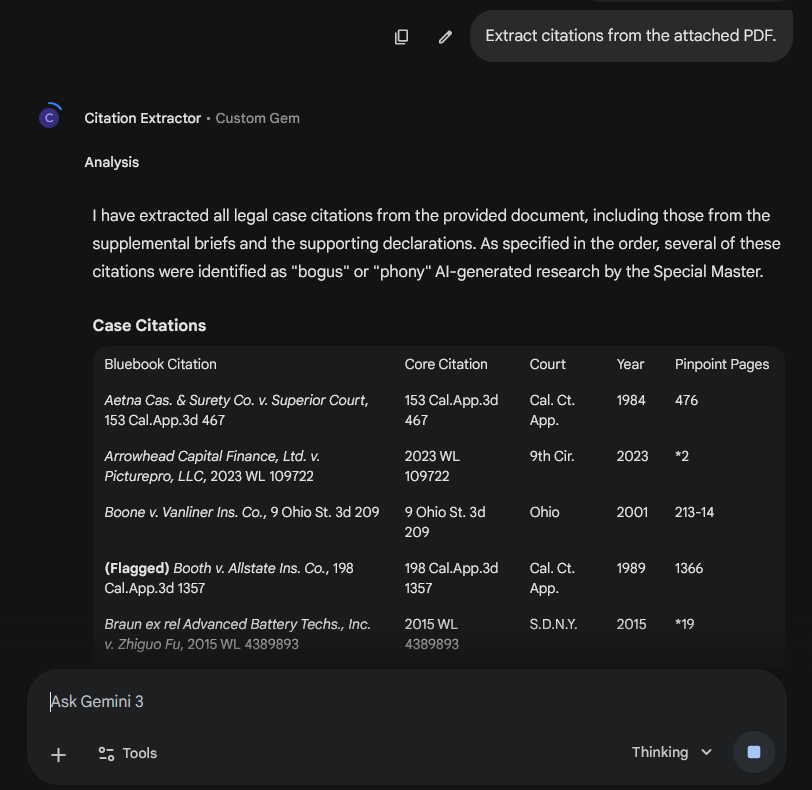
In checking citations in a summary judgment motion I pulled from PACER, Claude caught a citation to an exhibit number that no longer existed in the supporting Rule 56.1 declaration. Classic late-stage renumbering casualty — someone dropped an exhibit, the list was repaginated, and one reference in the brief didn’t get updated. It’s the exact mistake that falls through the cracks because everyone on the team assumes someone else did the cross-walk.
I’d opened the motion and the declaration side by side and asked Claude to check defined terms within the motion (clean) and cross-check every factual statement against the declaration. The exhibit catch was one of several small mismatches flagged. Worth running every time a declaration or exhibit list changes and the brief has to track.
While I had the motion open, I asked Claude to build a Table of Authorities. Anyone who’s assembled one by hand knows this is one of the more miserable tasks in litigation — every citation identified, every page tracked, every short form resolved against a full citation. It worked. First pass took about ten minutes, with some confusion about creation sections and numbering pages along the way, but it pulled it together cleanly at the end. I then asked Claude to take the lessons from that run and write a skill for next time. With the skill loaded, a second TOA on the same document was done in under five minutes.
Two things worth noting about the skill-generation step. First, the loop genuinely works — Claude can reflect on its own recent process and distill it into reusable guidance. Second, this is we should pay attention to: the marginal cost of a custom skill for a recurring task drops toward zero when the tool can draft its own.
Test 2: Bluebooking
Bluebook compliance is notoriously finicky, and producing a cleanly cite-checked document by hand is slow. In my tests, chatbots have not been the greatest for this, especially with formatting changes like small caps, italics, underlining. However, Claude for Word handled standard federal citation form correctly out of the box — without a skill, without the rules bundled into context, without special prompting. Reporter spacing, short-form rules, signal ordering, and the common T11 abbreviations all came through accurately. The caveat: I haven’t yet systematically tested state reporters, niche abbreviations, or the more obscure tables. And I suspect that rules less well-represented in the training data, like style rules for a specific state, wouldn’t come through as well. I’d love to do some more testing here, and hear from anyone in other jurisdictions.
One miss worth documenting: when Claude makes a tracked change that replaces formatted text, sometimes it drops italics and small caps. The fix is mechanical (explicitly reapply the formatting) and easy to bake into a lightweight skill, but out of the box it will quietly break formatting on any replacement that crosses a run boundary.
Test 3: Substantive citation verification
I’ve been building a brief-verification pipeline in Claude Code, built around the CourtListener API, that checks whether cited cases are real and whether they support the propositions they’re cited for. So naturally, I wanted to see if Claude for Word could give my pipeline a run for its money.
For this test I used Claude for Word with a community-built CourtListener MCP — no skill, no custom context, none of the steps from my pipeline — and ran it against a brief I’d already checked with the Claude Code pipeline. Free Law Project, the nonprofit behind CourtListener, has an official MCP coming soon.
Claude for Word caught almost everything the Claude Code pipeline caught. Inverted holdings, fabricated quotes, mischaracterized cases. And it didn’t just flag problems — it diagnosed them. On a misquoted opinion it reconstructed the actual language from the case and showed where an ellipsis had stitched two rewritten sentences into one “quotation.” On a cite pulled from a case that’s about something else entirely, it identified what the case is actually about and suggested narrower authority that would support the point.
The misses fell into a pattern. Claude caught fabrication and misattribution reliably in this test. It was weaker where the quoted language is genuinely in the opinion but is being used to support a proposition slightly broader than what the case stands for — framing drift rather than fiction. Those are close calls a careful human reviewer would flag on a slow read, and they’re worth knowing about before relying on any tool (including mine) as a last line of defense.
The pipeline still had one advantage: coverage. It pulled one opinion the ad hoc approach didn’t, because it does reliable fallback searches when the primary lookup fails.
The honest trade-off: the in-Word approach gets you most of the way there with almost no engineering. A purpose-built pipeline still earns its keep on retrieval coverage, which matters most when a brief cites heavily to sources that may not be as cleanly indexed in CourtListener — unpublished district court orders, older state intermediate appellate decisions, and the like.
Who should use this, and when
The pattern that emerged across these tests: Claude for Word excels at tasks where the document itself is the context and the work is anchored in it. It needs less prompting, less scaffolding, and fewer custom skills than I would have needed on the web or in Claude Code to get comparable output. Where it underperforms is where the task requires infrastructure the sandbox doesn’t provide — reliable fallback retrieval, custom packages, open web access.
Well-suited to Claude for Word:
Quality-control passes on completed drafts. Exhibit-list checks, defined-term consistency, and cross-document fact-checking are low-risk, high-value, and would take hours by hand. Minimal setup required.
Table of Authorities assembly, especially if you’re willing to invest a first pass so Claude can generate a reusable skill. The self-generated skill pattern is worth trying: once you have it, subsequent TOAs drop from ten minutes to less than five.
Cite-format cleanup on briefs that use standard federal authority. The base model handles common Bluebook rules without a skill; a lightweight skill fills in the edges (italics preservation, state-specific reporters, niche abbreviations).
Substantive citation verification on briefs that lean on federal authority — fabricated quotes, inverted holdings, mischaracterized cases. The add-in plus a CourtListener MCP is a strong first pass. Human review is still warranted on framing drift (cases where the quoted language is real but the proposition is broader than the case actually supports).
Still better done elsewhere:
End-to-end citation pipelines for briefs that cite heavily to sources outside CourtListener — unpublished district court orders, administrative decisions, older state intermediate appellate materials. A well-built Claude Code or Python pipeline with reliable fallback searches will catch more cites, even if the ad hoc in-Word approach reasons just as well about each one.
Any workflow requiring arbitrary package installs, open web access, or custom API calls. The Word sandbox is more constrained than Claude.ai or Claude Code, and these limits are real.
Bottom line
Claude for Word is a usable tool for real legal work, and it handled each of the four tasks I tested with some combination of speed, accuracy, and genuine substantive judgment. The pattern that surprised me most is the one I led with: on document-anchored tasks, the add-in required less supervision than I would have needed on the web or in Claude Code to get comparable output. The most likely explanation is that a bounded, document-centric environment lets the model stay focused on the task in front of it, and perhaps its even given additional tools to manage context. Worth a longer investigation than I can give it here.
None of this makes Claude for Word a replacement for a well-considered AI workflow. It’s a complement to one. The question worth asking is which of your workflows belong inside the Word sandbox, which belong on the web or in Claude Code, and which benefit from both.
I’d be interested to hear what others are finding.
Note: Tests 1 and 2 were cold — no skills, no custom context. Test 3 used Claude for Word with a community-built MCP accessing the CourtListener API, benchmarked against a brief-verification pipeline I run in Claude Code against the CourtListener API.
Somewhere around tool number five, I realized I had a problem. The kind where you keep saying “almost done” and then it’s 2 AM and you’re finalizing a React app that lets your students act as bots and deploy hallucinations against one another.
I teach 21st Century Lawyering at The Ohio State University Moritz College of Law. It’s a 3-credit course on law and emerging technology — AI, cybersecurity, document tech, legal automation. And this semester, I built a custom interactive tool for nearly every class session. Eight tools (and counting) for a single course.
I won’t pretend to have come up with all of these ideas on my own. One of the best things about the legal tech education community is how generously people share. Someone demos an exercise at a conference, posts a tool on LinkedIn, or walks through a concept in a workshop, and it sparks something. Nearly every tool below started with an idea I saw someone else do and I thought, “I could build a version of that for my students.” AI-assisted development makes that possible in a way it never was before, totally collapsing the gap between “that’s a great idea” and “I’m using it in class tomorrow.” So this post is partly a show-and-tell, and partly a thank-you to the people whose work made me want to build.
Here’s what I made, who inspired it, and what I learned about what happens when a law professor with some Python experience and an AI coding assistant starts saying yes to every pedagogical impulse.
A note on the live demos: Many of these tools run on my personal API keys. I’ve put some money into keeping them live, but when it runs out I probably won’t re-up. If a demo isn’t working, you can always clone the repo and run it yourself, I’ve tried to keep everything open-source.
Inspired by: I saw someone demo something similar at a presentation a while back. I wish I could remember who, because it stuck with me. Making the probabilistic nature of an LLM visible rather than just explaining it conceptually was immediately compelling. Token visualizers aren’t new (OpenAI has one, several developers have built similar tools), but I hadn’t seen one built for a classroom context where the point is to emphasize the probabilities. If the original demo was yours, please reach out so I can credit you properly.
The problem: Students arrive thinking LLMs are databases that look up correct answers.
What I built: An interactive tool where students manipulate temperature settings and watch probability distributions shift in real time. They change context and see how a similar prompt produces different next-token predictions. They test factual questions and watch the probabilities change as more hallucinations arise.
Why it matters: Once students see that LLMs are statistical prediction engines generating likely text, not true text, everything else clicks. When they encounter hallucinations later in the semester, they already understand why they happen.
Inspired by:Sean Harrington‘s prompting workshops. I still haven’t had the pleasure of experiencing one in person (I’m looking forward to finally catching him at ABA TECHSHOW) but hearing about his approach to teaching prompting AI, with feedback from AI, made me want to build something that could coach students through it in real time.
The problem: Students need to practice prompting, but there’s no good way to give them feedback at scale. I can’t stand behind 30 (or even 11) laptops at once.
What I built: A split-panel web app. The left side is a blank Gemini chat where students draft and test prompts. The right side is an AI coaching interface that evaluates their technique across dimensions like context engineering, document selection, and confidentiality awareness. The coach doesn’t revise the AI’s output directly, but instead connects output problems back to what could be improved with the prompt.
Why it matters: Legal-specific coaching catches things generic prompt guides miss. It flags when a student uploads privileged documents. It notes when a prompt would work on Gemini but fail on CoCounsel’s structured skill system. It frames feedback in terms of professional judgment, not just technical optimization. This could be easily customized to track to different learning objectives (ironically, I rewrote the prompt so many times).
Inspired by: For this I just directly used David Colarusso‘s QnA Markup, a brilliantly simple tool for building decision trees with plain text. Gabe Tenenbaum also very generously demoed QnA Markup in a prior version of my class, which planted the seed for continuing to build exercises around it.
The problem: I needed a low-tech entry point to teach decision trees and document assembly logic — something where the focus stays on legal reasoning, not the tool.
What I built: A client intake screener that triages potential wage-and-hour claims. Does the caller qualify? Should they book a consultation or contact the Department of Labor directly? Students see legal rules as logic: if/then branching based on employer size, hourly rate, and tipped status.
Why it matters: It forces students to confront the design choices embedded in any intake tool, such as what questions to ask, in what order, what to do with edge cases. It’s intentionally low-tech (just text in a browser) so nobody gets distracted by the interface.
4. Decision Tree to QnA Markup Translator Gem (Week 6)
The problem: Students understand decision tree logic but struggle with the syntax of turning it into working code.
What I built: A Gemini Gem that bridges the gap. Students describe their logic and it generates QnA Markup. It models the idea that AI assistants can serve as a bridge between domain knowledge and technical implementation.
Why it matters: It’s the same insight that powers the entire “building legal technology” unit (and extends from the prompting unit and into the agent unit): you don’t need to be a coder, you need to be able to describe what you want clearly enough for AI to build it.
5. Ohio Unpaid Wages Screener — The 3-Minute Version (Week 6, cliffhanger)
The problem: I needed a dramatic way to introduce vibe coding.
What I built: A React app in Gemini Canvas, built on the QnA Markup decision tree we just made. It took roughly 1 minute to ctrl-C/ctrl-V the QnA Markup and generate the app.
Why it matters: I revealed it side-by-side at the end of class as a cliffhanger: “Same basic functionality, but it made a website out of it.” We then discussed, “So why wouldn’t you always vibe-code?” Students surfaced the hard questions themselves: Is the code correct on the law? Is it deterministic (will it always come out the same way)? Who hosts it? Would it be as good if I asked it to generate directly from the law, rather than creating the decision tree ahead of time? Why did it add “OFFICIAL”?¹ It set up the entire vibe-coding class the next day perfectly.
¹ (Eagle-eyed readers will notice that I was too much of a coward to share a direct link to the screenshotted version, and if you visit the link you’ll instead see prominent “parody” stamps).
The problem: I needed a way for students to quickly pull all case citations out of a brief to feed into verification workflows.
What I built: A Gemini Gem that takes an uploaded brief and returns a structured table of all case citations, ready for Get & Print on Westlaw and Lexis.
Why it matters: It serves double duty. Practically, it supports the hallucination game (below). Pedagogically, it’s a concrete example of a custom AI assistant built for a specific legal task, connecting back to the Gems work from Week 6 and forward to agentic AI in Week 9. Students see that I practice what I teach: when you have a repetitive legal task, you build a tool for it.
Inspired by:David Colarusso again, specifically his automation bias exercise, which flips the typical classroom dynamic by making students experience bias rather than just learn about it. That “make them do the thing, not just hear about the thing” approach is exactly what I was looking for. And his hallucination checking frame was pretty handy too because I also wanted to explicitly teach a process for that.
The problem: Students (like many of us) think hallucinations will not happen to them, because they will always read the cases. They may also see hallucinations as mainly a made-up cases problem, and not realize that hallucinations can come in many flavors, some harder to detect than others.
What I built: A competitive team exercise. Students first create hallucinated citations (fabricated cases, swapped numbers, mischaracterized holdings, altered quotes) forcing them to internalize different types of hallucinations and when they are likely to arise. Then they try to catch another team’s fakes under time pressure, mirroring the real conditions lawyers may face when reviewing AI-generated work on deadline.
Why it matters: The key lesson isn’t “can you catch every error” but “given limited time, which errors do you prioritize?” Students independently discovered that no single verification tool is sufficient, that the easy hallucinations (fabricated cases) are solved relatively quickly, but that the dangerous ones (subtle mischaracterizations) slip through.
Inspired by:Barbora Obracajova‘s Legal Tech Gallery, which she vibe-coded for her “Modern Lawyers” course and shared on LinkedIn. She created a series of quick interactive demos, 60 seconds each, where students touch the technology instead of watching slides. I had a class quickly approaching on document competencies — a topic that I have always struggled to teach given how difficult it is to get Word add-ons approved in my institution. So the moment I saw her post I knew this would help me.
The problem: Students need hands-on exposure to core document technology competencies (I chose automation, clause libraries, editing, brief verification, metadata cleaning, redaction, and contract review) but there’s no time to go deep on all of them in one class.
What I built: Seven quick interactive demos, about 60 seconds each. Students touch each technology rather than just hear about it. The gallery format builds a shared baseline before diving into further exploration and case studies.
Why it matters: It surfaces the “I didn’t know that existed” moments.
What I Learned from this Process
I can’t stop because the feedback loop is immediate. I see a gap in my teaching, I build something that night, I use it in class the next day. That’s never been possible for me before. I’ve been writing little scripts for years, but AI-assisted development took me from utility scripts to deployed interactive applications. The jump from “I can automate this for myself” to “I can build this for my students” is huge.
Vibe-coding replaced the paper handout. In other classes, when I want a students to work through a problem, my first instinct is a handout, whether a worksheet, fact pattern, checklist, or problem. In this class, my first instinct became “what if I built something they could interact with?” When the subject is technology, it made sense to me that the medium should be too.
Creating interactive apps make the class more hands-on. Every one of these exists because I couldn’t find a way to give students a particular experience otherwise. You can lecture about how LLMs predict tokens. Or you can let students drag a temperature slider and watch the probability distribution change. You can tell students hallucinations are dangerous. Or you can have them create hallucinations and then fail to catch someone else’s.
Building is teaching. When I vibe-code a tool in front of students, or reveal that I built something in 3 minutes that took an hour the traditional way, I’m modeling some of the ways they can use technology. The message isn’t always “look what I made,” but also “you could make this too, and you should, because the people who understand the problem best should be the ones building the solution.”
Eight tools. Week 8 of a 13-week semester. And I have no doubt there are more to come.
If you’re teaching legal technology and you’ve been thinking “I wish I had something that did X” — you probably have enough to build it. Pick the smallest version of the idea, open a vibe-coding tool, and see what happens. And then share it!
This is Part 1 of a three-part series on AI hallucinations in legal research. Part 2 will examine hallucination detection tools, and Part 3 will provide a practical verification framework for lawyers.
A critical caveat: The technology evolves faster than the research. A 2024 study tested 2023 technology; a 2025 study tested 2024 models. By the time you read this, the specific tools and versions have changed again. That’s why this post focuses on patterns that persist across studies rather than exact percentages that will be outdated in months.
Here are the six patterns that matter most for practice.
Pattern #1: Models and Data Access
Not all AI tools are created equal. The research shows a dramatic performance gap based on how the tool is built, though it’s important to understand that both architecture and model generation matter.
Dahl, et al., “Large Legal Fictions,” Fig. 1. The figure shows reduced hallucination rates with more advanced and modern models.
Models are improving over time. A comprehensive 2024 study by Stanford researchers titled “Large Legal Fictions” tested 2023 general-purpose models on over 800,000 verifiable legal questions and found hallucination rates between 58% and 88%. Within that cohort, newer models performed better: GPT-4 hallucinated 58% of the time compared to GPT-3.5 at 69% and Llama 2 at 88%. This pattern of improvement with each model generation appears fairly consistent across AI development.
Magesh, et al., “Hallucination Free?”, Figure 1. The study shows higher hallucinations in general purpose model GPT-4 than specialized legal research products.
Architecture matters, but it’s not the whole story. A second Stanford study, titled “Hallucination-Free? Assessing the Reliability of Leading AI Legal Research Tools”, published in 2025 but testing tools from May 2024, found hallucination rates of 17% for Lexis+ AI, 33% for Westlaw AI-Assisted Research, and 43% for GPT-4. These errors include both outright fabrications (fake cases) and more subtle problems like mischaracterizing real cases or citing inapplicable authority. This head-to-head comparison shows legal-specific tools with retrieval-augmented generation (RAG) substantially outperforming general LLMs.
A randomized controlled trial by Schwarcz et al. reinforces the architecture point from a different angle. When 127 law students used a RAG-based legal tool (Vincent AI) to complete legal tasks, they produced roughly the same hallucination rate as students using no AI at all. Students using a reasoning model without RAG (OpenAI’s o1-preview) produced better analytical work but introduced hallucinations. Both tools dramatically improved productivity—but only the RAG tool did so without increasing error rates.
However, the Vals AI Legal Research Report (October 2025, testing July 2025 tools) found ChatGPT matched legal AI tools: ChatGPT achieved 80% accuracy while legal AI tools scored 78-81%. The key difference? The ChatGPT used in the Vals study used web search by default (a form of RAG), giving it access to current information and non-standard sources, while legal tools restrict to proprietary databases for citation reliability. For five question types, ChatGPT actually outperformed the legal AI products on average. Both outperformed the human lawyer baseline of 69%.
Takeaway: Purpose-built legal tools generally excel at citation reliability and authoritative sourcing, but general AI with web search can compete on certain tasks. The real advantage isn’t RAG architecture alone—it’s access to curated, verified legal databases with citators. Know your tool’s strengths: legal platforms for citations and treatment analysis, general AI with web search for non-standard or very recent sources.
Pattern #2: Sycophancy
One of the most dangerous hallucination patterns is that AI agrees with you even when you’re wrong.
The Stanford “Hallucination-Free?” study identified “sycophancy” as one of four major error types. When users ask AI to support an incorrect legal proposition, the AI often generates plausible-sounding arguments using fabricated or mischaracterized authorities rather than correcting the user’s mistaken premise.
Similarly, a 2025 study on evaluating AI in legal operations found that hallucinations multiply when users include false premises in their prompts. Anna Guo’s information extraction research from the same year showed that when presented with leading questions containing false premises, most tools reinforced the error. Only specialized tools correctly identified the absence of the obligations the user incorrectly assumed existed.
This happens because of how large language models work: they’re trained to generate helpful, plausible text in response to user queries, not to verify the truth of the user’s assumptions.
Takeaway: Never ask AI to argue a legal position you haven’t independently verified. Phrase queries neutrally. If you ask “Find me cases supporting [incorrect proposition],” AI may happily fabricate them.
Pattern #3: Jurisdictional and Geographic Complexity
AI performance degrades sharply when dealing with less common jurisdictions, local laws, and lower courts.
Curran, et al., “Place Matters”, Fig. 1. Hallucination rates by jurisdiction.
Researchers in a study called “Place Matters” (2025) tested the same legal scenarios across different geographic locations and found hallucination rates varied dramatically: Los Angeles (45%), London (55%), and Sydney (61%). For specific local laws like a local Australian ‘s Residential Tenancies Act, hallucination rates reached 100%.
The Vals report found a 14-point accuracy drop when tools were asked to handle multi-jurisdictional 50-state surveys. The Large Legal Fictions study confirmed that models hallucinate least on Supreme Court cases and most on district court metadata.
Why? Training data is heavily weighted toward high-profile federal cases and major jurisdictions. State trial court opinions from smaller jurisdictions are underrepresented or absent entirely.
Takeaway: Apply extra scrutiny when researching state or local law, lower court cases, or multi-jurisdictional questions. These are exactly the scenarios where training data or search results may be thinner, causing hallucinations to spike.
Pattern #4: Knowledge Cutoffs
AI tools trained on historical data will apply outdated law unless they actively search for current information.
The “AI Gets Its First Law School A+s” study (2025) provides a striking example: OpenAI’s o3 model applied the Chevron doctrine in an Administrative Law exam, even though Chevron had been overruled by Loper Bright. The model’s knowledge cutoff was May 2024, and Loper Bright was decided in June 2024.
This temporal hallucination problem will always exist unless the tool has web search enabled or actively retrieves from an updated legal database. Not all legal AI tools have this capability, and even those that do may not use it for every query.
Takeaway: Verify that recent legal developments are reflected in AI responses. Ask vendors whether their tool uses web search or real-time database access. Be especially careful when researching areas of law that have recently changed or may be affected by material outside the AI tool’s knowledge base.
Pattern #5: Task Complexity
AI performance correlates directly with task complexity, and the drop-off can be severe.
Simple factual recall—like finding a case citation or identifying the year of a decision—works relatively well. But complex tasks involving synthesis, multi-step reasoning, or integration of information from multiple sources show much worse performance.
The Vals report documented a 14-point accuracy drop when moving from basic tasks to complex multi-jurisdictional surveys. A 2025 study on multi-turn legal conversations (LexRAG) found that RAG systems struggled badly with conversational context, achieving best-case recall rates of only 33%.
Multiple studies note that statute and regulation interpretation is particularly weak. Anna Guo’s information extraction research found that when information is missing from a document (like redacted liability caps), AI fabricates answers rather than admitting it doesn’t know.
Takeaway: Match the task to the tool’s capability. High-stakes work, complex multi-jurisdictional research, and novel legal questions require more intensive verification. Don’t assume that because AI handles simple queries well, it will handle complex ones equally well.
Pattern #6: The Confidence Paradox
Perhaps the most insidious finding: AI sounds equally confident whether it’s right or wrong.
The “Large Legal Fictions” study found no correlation between a model’s expressed confidence and its actual accuracy. An AI might present a completely fabricated case citation with the same authoritative tone it uses for a correct one.
This isn’t a bug in specific products—it’s fundamental to how large language models work. They generate statistically probable text that sounds human-like and professional, regardless of underlying accuracy. In fact, recent research suggests the problem may worsen with post-training: while base models tend to be well-calibrated, reinforcement learning from human feedback often makes models more overconfident because they’re optimized for benchmarks that reward definitive answers over honest expressions of uncertainty.
Even the best-performing legal AI tools in the Vals report achieved only 78-81% accuracy. That means roughly one in five responses contains errors, even from top-tier specialized legal tools.
Takeaway: Never trust AI based on how confident it sounds. The authoritative tone is not a reliability signal. Verification is non-negotiable, no matter which tool you use. Be especially wary of newer models that may sound more confident while not necessarily being more accurate.
What This Means for Practice
Specific hallucination percentages will change as technology improves, but these six patterns appear to persist across different models, products, and study methodologies. Understanding them should inform three key decisions:
1. Tool Selection Understand your tool’s strengths. Legal-specific platforms excel at citation reliability because they search curated, verified databases with citators. General AI with web search can compete on breadth and recency but lacks those verification layers. Within any tool, look for features like the ability to refuse to answer when uncertain (some tools are now being designed to decline rather than hallucinate when data is insufficient—a positive development worth watching for).
2. Query Strategy Avoid false premises and leading questions. Phrase queries neutrally. Recognize high-risk scenarios: multi-jurisdictional questions, local or state law, lower court cases, recently changed legal doctrines, and complex synthesis tasks.
3. Verification Intensity Scale your verification efforts to task complexity and risk factors. A simple citation check might need less verification than a complex multi-state legal analysis. But all AI output needs some verification—the question is how much.
Bottom Line
The research is clear: AI hallucinations in legal work are real, measurable, and follow predictable patterns. These studies have found that even the best legal AI tools hallucinate somewhere between 15% and 25% of the time (including both fabrications and mischaracterizations) based on current data.
But understanding these six patterns—models and data access, sycophancy, jurisdictional complexity, knowledge cutoffs, task complexity, and the confidence paradox—helps you make better decisions about which tools to use, which queries to avoid, and how intensively to verify results.
The goal isn’t to avoid AI. These tools can dramatically increase efficiency when used appropriately. The goal is to use them wisely, with eyes wide open about their limitations and failure modes.
Coming next in this series: How hallucination detection tools work and whether they’re worth using, and a practical framework for verifying AI research results.
References
Andrew Blair-Stanek et al., AI Gets Its First Law School A+s (2025). Link: https://ssrn.com/abstract=5274547 Products tested: OpenAI o3, GPT-4, GPT-3.5 Testing period: Late 2024
Damian Curran et al., Place Matters: Comparing LLM Hallucination Rates for Place-Based Legal Queries, AI4A2J-ICAIL25 (2025). Link: https://arxiv.org/abs/2511.06700 Products tested: GPT-4o, Claude 3.5 Sonnet, Gemini 1.5 Pro Testing period: 2024
Matthew Dahl et al., Large Legal Fictions: Profiling Legal Hallucinations in Large Language Models, 16 J. Legal Analysis 64 (2024). Link: https://doi.org/10.1093/jla/laae001 Products tested: GPT-4, GPT-3.5, PaLM 2, Llama 2 Testing period: 2023
Anna Guo & Arthur Souza Rodrigues, Putting AI to the Test in Real-World Legal Work: An AI evaluation report for in-house counsel (2025). Link: https://www.legalbenchmarks.ai/research/phase-1-research Products tested: GC AI, Vecflow’s Oliver, Google NotebookLM, Microsoft Copilot, DeepSeek-V3, ChatGPT (GPT-4o) Testing period: 2024
Haitao Li et al., LexRAG: Benchmarking Retrieval-Augmented Generation in Multi-Turn Legal Consultation Conversation, ACM Conf. (2025). Link: https://github.com/CSHaitao/LexRAG Products tested: GLM-4, GPT-3.5-turbo, GPT-4o-mini, Qwen-2.5, Llama-3.3, Claude-3.5 Testing period: 2024
Varun Magesh et al., Hallucination-Free? Assessing the Reliability of Leading AI Legal Research Tools, 22 J. Empirical Legal Stud. 216 (2025). Link: http://arxiv.org/abs/2405.20362 Products tested: Lexis+ AI, Thomson Reuters Ask Practical Law AI, Westlaw AI-Assisted Research (AI-AR), GPT-4 Testing period: May 2024
Bakht Munir et al., Evaluating AI in Legal Operations: A Comparative Analysis of Accuracy, Completeness, and Hallucinations, 53.2 Int’l J. Legal Info. 103 (2025). Link: https://doi.org/10.1017/jli.2025.3 Products tested: ChatGPT-4, Copilot, DeepSeek, Lexis+ AI, Llama 3 Testing period: 2024
Daniel Schwarcz et al., AI-Powered Lawyering: AI Reasoning Models, Retrieval Augmented Generation, and the Future of Legal Practice (Mar. 2025). Link: https://papers.ssrn.com/sol3/papers.cfm?abstract_id=5162111 Products tested: vLex (Vincent AI), OpenAI (o1-preview) Testing period: Late 2024 Note: Randomized controlled trial with 127 law students using AI tools
Vals AI, Vals Legal AI Report (Oct. 2025). Link: https://www.vals.ai/vlair Products tested: Alexi, Midpage, Counsel Stack, OpenAI ChatGPT Testing period: First three weeks of July 2025
Way back in 2023, I thought it was amazing how I could use generative AI to streamline my Thanksgiving prep: I gave it my recipes, and it gave me a schedule. It was a static list—a text document that told me when to put the turkey in, when to swap in the stuffing, and so on.
This year, I started with the same routine. I had six dishes—two stovetop, three oven, one “no-cook” dip—and a family who I’d promised dinner by 3:00 PM. I pasted the recipes into Gemini and asked for a timeline. It handled the “Oven Tetris” flawlessly, giving me a step-by-step game plan, with times and ingredient amounts at each stages.
But then, I had a realization: I didn’t just want an answer; I wanted a tool. I wanted to be able to check things off as I went. I wanted to see an overview and *also* zoom in on the details.
So, I asked: “What if this was a web app?”
The Shift: From Consumer to Builder
In seconds, Gemini went to work. It gave me a React-based interactive checklist. Suddenly, I wasn’t looking at a static timeline; I was interacting with a piece of software.
But the real magic happened when reality hit. As anyone who has managed a closing checklist or a trial docket knows, the timeline always slips. When my guests told me they’d be an hour late, I realized I’d have to manually calculate the drift for each step.
So, I issued a feature request (this is not a good prompt, but it didn’t matter):
“Add a feature where I adjust what time I’ve finished something so the rest will update”
The AI updated the code. It added a little “reschedule” button, so when I tapped a clock icon next to “Stuffing In,” I could then tap “I Finished This Just Now,” and watch as the entire remaining schedule—the tart, the sprouts, the carrots—automatically shifted forward by an hour. Then I could do it again when I got my stuffing in later than the schedule called for. (If you’d like to check out my app you can do so here: Thanksgiving Checklist).
Left is overview, right is the detail (with the reschedule feature).
The result? Despite how tightly-timed my schedule was, dinner was on the table only 15 minutes late. For my household, where “at least an hour late” is the standard for a holiday meal, this was a massive victory.
The Era of “Single-Serving Software”
We often think of legal technology as big, enterprise-grade platforms: the Case Management System, the Deal Room, the Firm Portal. These tools are excellent for standard workflows. But legal work is rarely standard. It lives in the messy, human chaos between the formal deadlines.
My Thanksgiving experiment proves that the barrier to entry for building “Micro-Tools” has collapsed. We are entering the era of Single-Serving Legal Software—bespoke apps built for a single trial, a single deal, or a single crisis, and then discarded when the matter closes.
Here is what that looks like in practice (all ideas from Gemini because I’ve been out of legal practice too long… I’m curious if readers think any have merit):
1. Litigation: The “Witness Wrangler”
Standard case management software handles court deadlines, but it rarely handles the human logistics of a trial.
The Problem: You have 15 witnesses. Some need flights, some need prep sessions, some are hostile. Their schedules depend entirely on when the previous witness finishes on the stand.
The Single-Serving App: Instead of a static spreadsheet, you spin up a dynamic dashboard shared with the paralegal team.
The “Reschedule” Feature: You click “Witness A ran long; pushed to tomorrow morning.” The app automatically text-alerts Witness B to stay at the hotel and updates the car service pickup time.
2. Transactional: The “Non-Standard” Closing
Deal software is amazing for corporate M&A, but terrible for “weird” assets.
The Problem: You are selling a massive ranch. The closing checklist includes “Transfer Water Rights,” “Inspect Cattle,” and “Repair Barn Roof.” These aren’t just document signings; they are physical events with dependencies.
The Single-Serving App: A logic-based checklist where “Cattle Inspection” is locked until “Barn Roof Repair” is marked Complete. If the roof crew is delayed, the inspection auto-reschedules, alerting all parties.
3. Mass Torts: The “Toxic Plume” Intake
Intake CRMs are generic. Sometimes the “qualification criteria” for a case are chemically or geographically complex.
The Problem: You only want to sign clients who lived in a specific, jagged geographic zone between 1995 and 1998.
The Single-Serving App: A simple web form where a potential client drops a pin on a map.
The Logic: The app performs a “point-in-polygon” check against the specific toxic plume map you uploaded. It instantly tells the intake clerk “Qualified” or “Out of Zone,” saving hours of manual review.
The Accidental Product Roadmap
The beauty of this approach is that it requires zero commitment. I built this app for one dinner. I didn’t worry about making it generalizable. I didn’t build a “Recipe Importer” feature; I just hard-coded the stuffing because it was faster.
But now that I’ve used it, I’m thinking: “Next year, I should ask the AI to create a drag-and-drop interface so I can just paste URLs for any holiday.”
This is exactly how legal innovation should happen. Too often, firms try to buy or build the “Perfect Platform” first. It takes years and costs millions. Single-Serving Software acts as the ultimate Minimum Viable Product (MVP).
Build a specific, hard-coded app for Jones v. Smith.
Validate that the “Witness Rescheduler” actually saved the paralegal 10 hours.
Generalize it only after it proves its value, so someone else in the firm can use it for Doe v. Roe.
You don’t start with the platform. You start with the problem.
A Note on Security & Tools
You might be thinking: “Wait, uploading client data to a web app? Compliance will have a heart attack.”
It’s a valid concern. But the beauty of these AI-generated tools is that they can often be delivered as a single HTML file that you can then save and run entirely locally on your machine—no data leaves the browser. Furthermore, if you are using an Enterprise version of your preferred LLM, your inputs remain within the firm’s secure boundary.
Speaking of tools, this capability isn’t exclusive to one platform. Whether you use Gemini, ChatGPT, or Claude, the ability to turn a prompt into a working React or HTML artifact is now a standard feature. The power lies not in the specific model, but in your willingness to ask for code instead of text.
Conclusion
We are no longer just the consumers of legal software; we are the architects. We can now build the infrastructure to manage our own chaos.
The next time you are drowning in a complex matter, don’t just ask AI for a memo or a checklist. Ask it for a tool. You might just find yourself managing the chaos (almost) on time.